
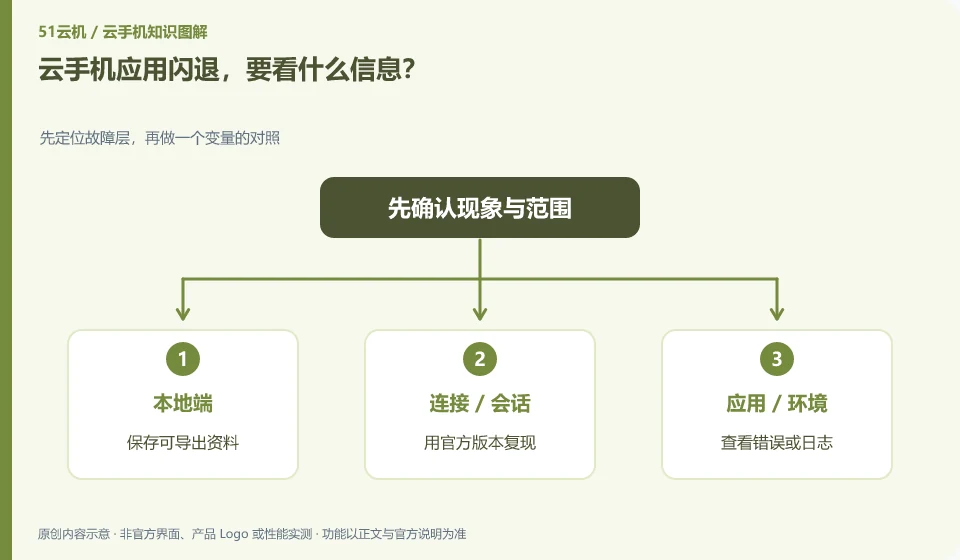
Record whether it occurred at startup, login or a certain function, and check the system, application version and resource status. Crash is just the result, not the cause.
Understand the essentials
Compatibility, permissions, graphics, data corruption and insufficient resources may cause the exit.
A practical example
Hypothetical example: the blank test page is normal, and the camera is opened before exiting, indicating that the camera function needs to be continued to check.
What to check or try
- Save exportable data.
- Reproduce with the official version.
- View errors or logs.
- Provide minimal steps to support staff.
If it is only triggered on a certain function, check the permissions and environment around that function instead of reinstalling from scratch every time. Use synthetic data when making minimal samples; if there are accounts or content in the log, desensitize it before submitting and do not upload the entire private directory.
An easy-to-miss detail
Do not clear data or change unknown installation packages at the beginning to avoid losing data and adding variables.
Continue reading
- Chinese input on a cloud phone is garbled or loses characters
- What to do when cloud phone storage is full
Back to Cloud phones: troubleshooting
Notes and further reading
Wuying Cloud Phone FAQ;Tencent Cloud Phone quick start。
This introductory guide was prepared by 51Yunji from public information with AI-assisted drafting. Examples are hypothetical, not hands-on product tests or promises of results. Follow the current product, version and official instructions for specific features and procedures. Compiled on October 26, 2026.