
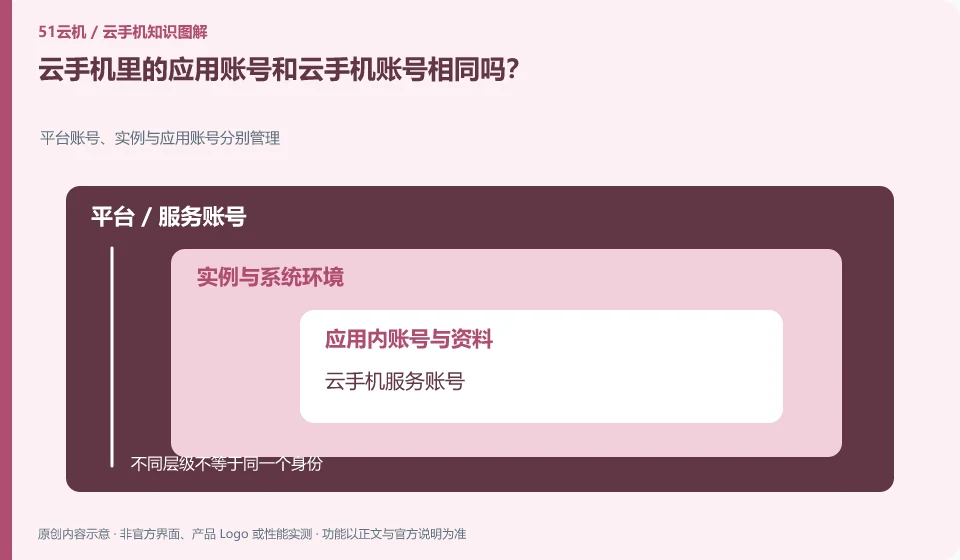
Usually they should be understood separately: one is used to enter the cloud service, and the other is used to log in to the specific application. Their passwords, recovery and exit may be independent.
Understand the essentials
Exiting the cloud service does not necessarily log out the remote application, and forgetting the application password does not necessarily affect the instance entry.
A practical example
Hypothetical example: Cloud Phone opens normally, but the learning application requires you to log in again. This should be handled according to the account process of the application.
What to check or try
- List account ownership.
- Check the official retrieval method.
- Use appropriate additional validation.
- Check separately when ending shared use.
To make a list of accounts, you don’t need to record plain text passwords. You only need to know the service, purpose and official retrieval method. At the end of shared devices, look at cloud services and application sessions separately. A successful prompt appears on a certain exit page, which does not prove that other accounts have also exited.
An easy-to-miss detail
Don’t set the same password for all services just for convenience, and don’t make recovery codes public.
Continue reading
- Does the same Android version guarantee app compatibility?
- Can a cloud phone receive an app's SMS verification code?
Back to Cloud phones: apps and data
Notes and further reading
Google Play Integrity setup;Android app storage overview。
This introductory guide was prepared by 51Yunji from public information with AI-assisted drafting. Examples are hypothetical, not hands-on product tests or promises of results. Follow the current product, version and official instructions for specific features and procedures. Compiled on October 26, 2026.