
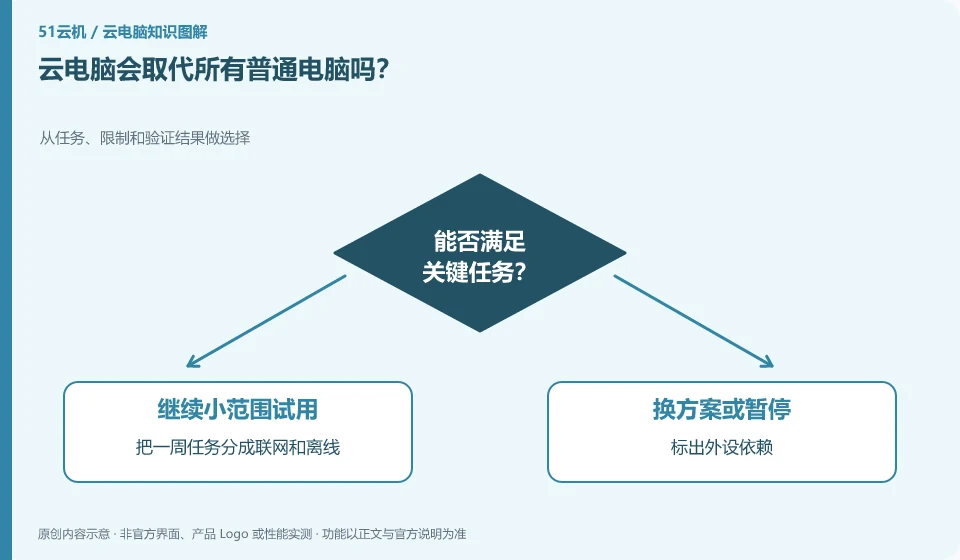
You can't judge like this. Depending on the networking conditions, software, peripherals, frequency of use and data requirements, cloud PC is more like an optional usage method.
Understand the essentials
The offline capabilities and direct connection hardware of local computers, as well as the centralized management and remote access of the cloud, each have their own applicable scenarios.
A practical example
Hypothetical example: People who frequently travel for temporary visits to the work environment have significantly different needs than people who operate equipment on-site without a network.
What to check or try
- Divide the weekly tasks into online and offline.
- Mark peripheral dependencies.
- Try it out with the most important tasks instead of committing to a full replacement first.
Before making a decision, list the conditions that cannot be compromised, such as working without a network connection, special equipment must be connected, and important files must be saved independently. Then see if the cloud can make up for the shortcomings of your existing solution. Keeping a mix of uses is often more flexible than pursuing total replacement.
An easy-to-miss detail
You can use a combination of both approaches, so you don't have to immediately eliminate working equipment for a new concept.
Continue reading
- Cloud PCs, cloud servers and cloud apps: how to tell them apart
- Trying a cloud PC for the first time: what to check
Back to Cloud PCs: getting started
Notes and further reading
Azure Virtual Desktop overview;Windows 365 Enterprise。
This introductory guide was prepared by 51Yunji from public information with AI-assisted drafting. Examples are hypothetical, not hands-on product tests or promises of results. Follow the current product, version and official instructions for specific features and procedures. Compiled on October 26, 2026.