
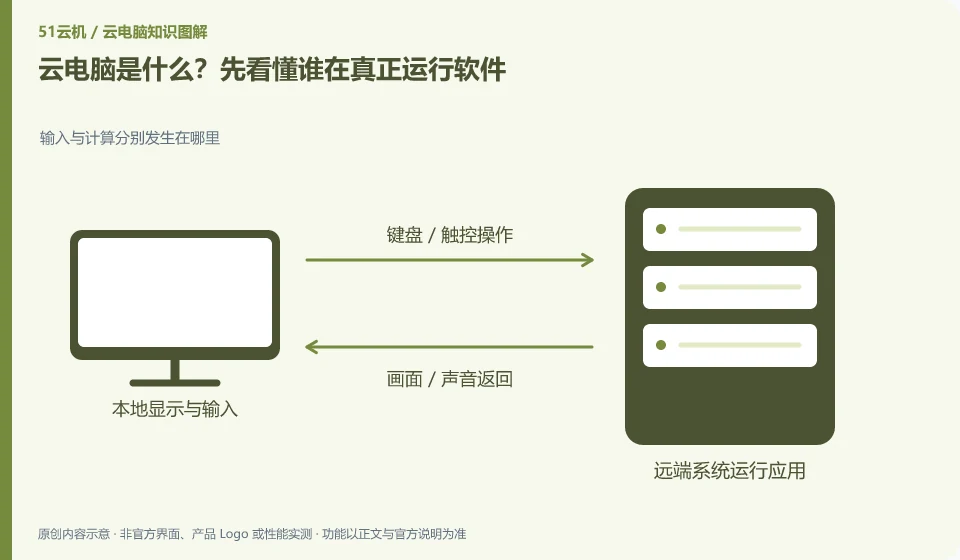
Cloud PC runs the desktop and software on a remote computing device. The device in your hand is mainly responsible for displaying the screen and delivering operations. It is not about downloading an application to make the local CPU stronger.
Understand the essentials
Think of it like using another desk across the network. The remote system is responsible for calculation, the local one is responsible for viewing and clicking, and the network between the two parties also participates in the experience.
A practical example
Hypothetical example: For example, if you use an old laptop to edit a document, the document program is running on the remote system; after disconnecting from the network, the local computer will not get the complete desktop.
What to check or try
- First confirm what the remote system is.
- Depends on which client you use to enter.
- Finally, try opening, editing and saving a file without sensitive information.
When making a judgment, you can ask yourself: If you replace the device in your hand with another one, will the remote working environment still be usable? This can help differentiate between local installation and remote operation. This way of understanding also explains why the local hard disk has a lot of space, but the remote system may still prompt that there is insufficient space.
An easy-to-miss detail
"Able to connect" only proves that the entrance is connected, but also confirms the software authorization, file location and saving rules after exiting.
Continue reading
- Trying a cloud PC for the first time: what to check
- Cloud PCs and cloud storage: what is the difference?
Back to Cloud PCs: getting started
Notes and further reading
Azure Virtual Desktop overview;Windows 365 Enterprise。
This introductory guide was prepared by 51Yunji from public information with AI-assisted drafting. Examples are hypothetical, not hands-on product tests or promises of results. Follow the current product, version and official instructions for specific features and procedures. Compiled on October 26, 2026.