
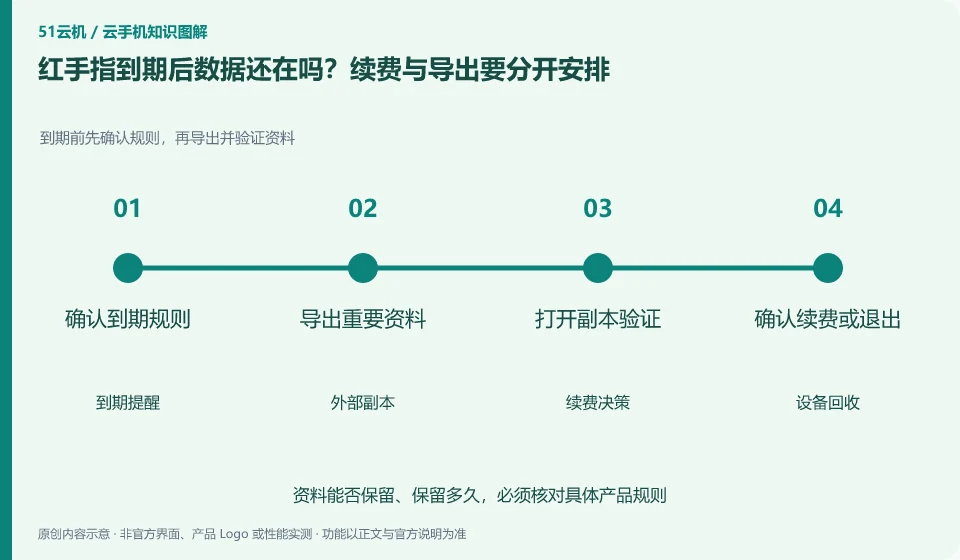
Regarding Redfinger, the key to this issue is: don’t understand being able to renew before expiration means that there is an infinite recovery window after expiration. Cloud Phone is a leased environment with a life cycle, and local files, application login status, and the device itself may be affected by recycling rules.
Known information about Redfinger and the key points of this verification
Redfinger provides cloud phone remote control and application hosting services. The official help area explains application upload, restart, factory reset and expiration recycling respectively.
Renewal should be based on existing equipment to avoid mistaking new cloud machines for extending original equipment; expiration rules should be checked with the current equipment order and help instructions.
The evidence boundary of this article is: different clients and system packages may be suitable for different functions; the performance promotion on the official website should not be regarded as actual measurement results.
How this issue applies to this product
Redfinger's renewal and new cloud machines should be distinguished by device objects. Buying a new device does not automatically mean that the validity period of the original device is extended; if important files are still in the old environment, selecting the wrong object in the order operation will make the backup arrangement useless. Before renewing, you should also check the original equipment number, expiration time, and the resources corresponding to the payment.
Official help provides clues about expiration, but any grace or recycling windows should be reviewed against current device rules. This article does not promise that files can be retrieved after expiration. If you plan to continue using it, you can confirm the order for the old equipment before renewing it; if you are ready to quit, you can export the non-regenerable content within the validity period and open it in other environments. Payment vouchers, account IDs and file copies are kept separately to avoid mistaking possible customer service assistance for permanent data recovery services.
The schedule can be used to set the export date before the actual expiration date and allow time to check the copy. In this way, even if the file export needs to be redone, there is no need to use the last opportunity to access the device to pay or inquire customer service. The time schedule itself is part of the data exit.
Understand what this question covers
Content that needs to be retained for a long time should be stored in a location that you can access independently. Listing the expiration date, automatic renewal status, and data export time on the same list will be more reliable than temporary operations when receiving reminders. The disposal capacity after recycling is subject to the current rules of the product and customer service confirmation.
Check in this order
- Check the expiration date, recycling instructions and auto-renewal status on your order.
- Export non-regenerable files in advance and check whether the backup copy is complete.
- Save order records after deciding to renew or exit to avoid operating on the wrong device.
Sources and scope
- Redfinger cloud phone official website
- Redfinger Product Answers
- Redfinger function operation
- Introduction to RedfingerAI Assistant
Sources checked on October 26, 2026. This article combines AI-assisted research of public information with independent analysis and verification suggestions; we have not conducted a hands-on test of this product. Features and costs depend on the current official documentation and your order.
Continue reading:Cloud phone basics · Cloud phone troubleshooting guide · Brand reference directory。
Related questions to explore
- What is Redfinger? Where it runs, how to access it and who it serves
- Installing Redfinger's client versus installing APKs in the cloud phone
- Redfinger restart versus factory reset: check your data first
Back to the brand and product knowledge directory · Browse cloud phone topics