
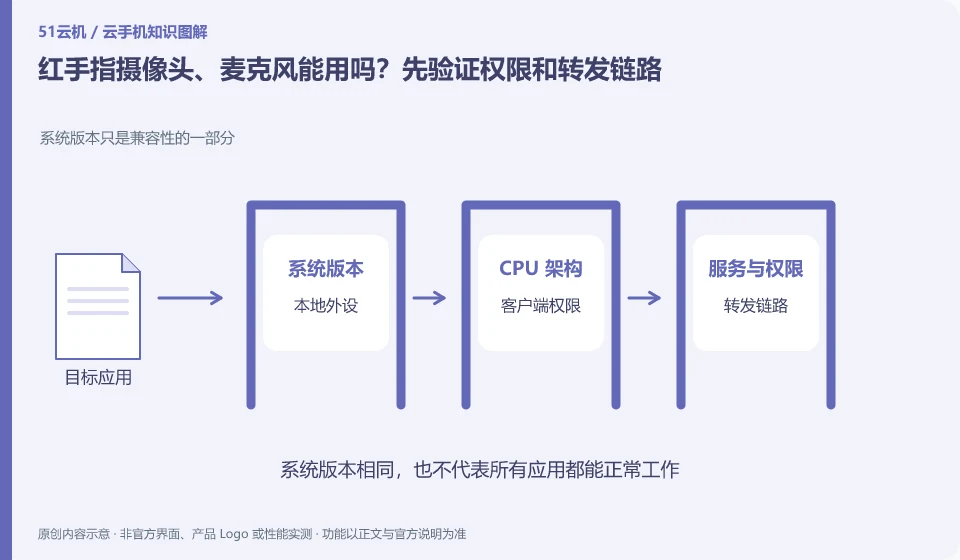
Regarding Redfinger, the key to this problem is: Cloud Android is not naturally connected to the physical camera in your hand. Whether code scanning, voice recording, and taking photos can be used depends on the product's local forwarding capabilities, client permissions, browser restrictions, and the requirements of the target application.
Known information about Redfinger and the key points of this verification
Redfinger provides cloud phone remote control and application hosting services. The official help area explains application upload, restart, factory reset and expiration recycling respectively.
The official FAQ mentions sound, microphone and camera management respectively, and they are also checked individually during verification, and the presence of sound is not equated with voice input.
The evidence boundary of this article is: different clients and system packages may be suitable for different functions; the performance promotion on the official website should not be regarded as actual measurement results.
How this issue applies to this product
The Redfinger product FAQ discusses sound, microphone and camera management respectively. It is important to read these items separately: being able to hear the sound played by the cloud machine only proves that the output link is available, and does not infer that the local microphone has been transmitted to the cloud; the camera entrance exists, and it does not infer that third-party applications are supported by all recognition processes.
For example, when demonstrating a QR code for public textbooks, you can first check the local camera permissions, then check whether the client provides corresponding forwarding, and finally enter the cloud application to observe the recognition results. Whichever layer the failure occurs at, the prompt for that layer will be retained. Voice recordings can additionally be verified with ordinary test sentences. Functions involving payment or identity verification have more specific application requirements. This article has not done an adaptation test. It is not recommended to guarantee based on general camera instructions, and it is not possible to bypass inspections by changing identity information.
When the browser or system pops up a permission request, only the items that are really needed for this task are granted. The recording test does not need to open the address book by the way, and the scan code test does not require the submission of real documents; using ordinary materials first can separate functional verification from unnecessary privacy exposure.
Understand what this question covers
Scenarios that require a camera are different than just playing back footage. There is a camera button in the device list, which does not prove that all face verification or payment processes are suitable. The test should start with taking photos and recordings without sensitive content before judging whether it is suitable for real tasks; do not change identity information in order to pass verification.
Check in this order
- Check local system permissions, client permissions and cloud application permissions respectively.
- First record a normal voice or take photos of non-private items and check the sound and picture.
- Verify the actual entry in the target application and use the physical device instead if not supported.
Sources and scope
- Redfinger cloud phone official website
- Redfinger Product Answers
- Redfinger function operation
- Introduction to RedfingerAI Assistant
Sources checked on October 26, 2026. This article combines AI-assisted research of public information with independent analysis and verification suggestions; we have not conducted a hands-on test of this product. Features and costs depend on the current official documentation and your order.
Continue reading:Cloud phone basics · Cloud phone troubleshooting guide · Brand reference directory。
Related questions to explore
- What is Redfinger? Where it runs, how to access it and who it serves
- Installing Redfinger's client versus installing APKs in the cloud phone
- Redfinger restart versus factory reset: check your data first
Back to the brand and product knowledge directory · Browse cloud phone topics