
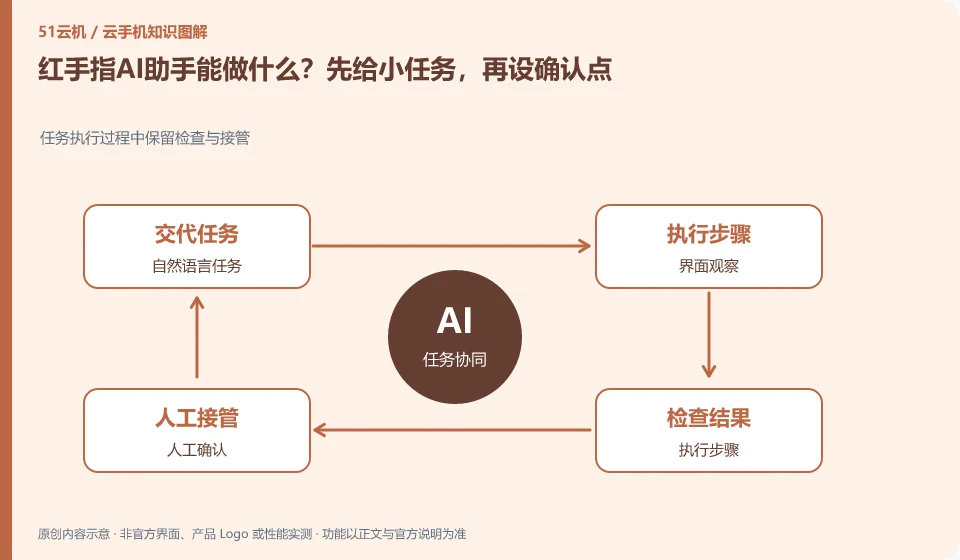
Regarding Redfinger, the key to this question is: the AI assistant is suitable for reducing repeated clicks and helping to understand the interface, but being able to understand a sentence does not mean that a long process can be completed correctly every time. For first time use, choose a revocable, low-impact task and observe how it positions the interface and handles failure.
Known information about Redfinger and the key points of this verification
Redfinger provides cloud phone remote control and application hosting services. The official help area explains application upload, restart, factory reset and expiration recycling respectively.
The AI assistant introduction can be used as a clue to the function entrance. Whether the actual account is available, whether the activity is ongoing, and the scope of support should still be confirmed on the client.
The evidence boundary of this article is: different clients and system packages may be suitable for different functions; the performance promotion on the official website should not be regarded as actual measurement results.
Understand what this question covers
Writing the goal as "which application to open, which page to go to, and where to stop" is easier to accept than a general requirement of "help me do it all." Steps involving payment, posting, deletion, or authorization should have manual confirmation points. Even if the cloud can continue to run, there is no guarantee that the agent can continue to understand all pop-up windows.
Consider a specific scenario
Suppose you want the assistant to open an app and stop at a specific settings page. This is a verification plan, not our experience using this product. First of all, "the page is visible when it arrives, and no content is saved or sent" as the completion standard for this time. The original data should be saved before the test, and the first attempt should not be placed directly on important accounts and unique file copies.
What is most easily overlooked in this scenario is that general goals will cause mistakes to accumulate, and stopping points must be set. Therefore, it is necessary to separate the status that can be seen on the interface from the results that really need to be delivered. Being able to reproduce, explain and withdraw is more valuable than getting only one success notification.
Check in this order
- Choose a small task as an example that does not involve an actual payment or outgoing message.
- State the completion criteria, confirmation points that are not allowed to be crossed, and stopping conditions in case of failure.
- Review the operation records and consider repeating the task after correcting the scope of the task.
A reusable verification log
You can copy the table below into your notes. Record the device ID, verification date and current version. It helps identify which step failed and lets you repeat the same checks after changing clients or services.
| Checkpoint | What counts as a pass | What to do if it fails |
|---|---|---|
| input range | Give a single goal, initial page, and allowed actions | When the requirements are vague, split them into short tasks first to avoid directly executing long links. |
| observational evidence | You can see the interface changes at each step or review the logs | Pause when feedback is missing to prevent automation from guessing states with repeated clicks |
| Completion standards | Determine success with clear pages, documents, or business results | When success or failure cannot be distinguished, manual review will be retained and will not continue to run. |
| abnormal stop | Login failure, pop-up windows and permission changes all have stop conditions. | High-impact steps must be additionally identified and authorizations not relaxed for automation |
How to submit records to Redfinger’s support channel
When submitting a question, first state "What can the Redfinger AI assistant do? Give it a small task first, and then set a confirmation point." Then attach the device number, selected client and system version, failure steps, and current time. The key point of verify in the brand information is "AI assistant introduction can be used as a clue to the function entrance. Whether the actual account is available, whether the activity is ongoing and the scope of support should still be confirmed on the client." Therefore, do not just send a screenshot of the homepage, nor do you need to put the complete password, verification code or private key into the problem description. When it comes to order or business qualifications, you should contact support from the official entrance where this product can be verified.
Sources and scope
- Redfinger cloud phone official website
- Redfinger Product Answers
- Redfinger function operation
- Introduction to RedfingerAI Assistant
Sources checked on October 26, 2026. This article combines AI-assisted research of public information with independent analysis and verification suggestions; we have not conducted a hands-on test of this product. Features and costs depend on the current official documentation and your order.
Continue reading:Cloud phone basics · Cloud phone troubleshooting guide · Brand reference directory。
Related questions to explore
- What is Redfinger? Where it runs, how to access it and who it serves
- Installing Redfinger's client versus installing APKs in the cloud phone
- Redfinger restart versus factory reset: check your data first
Back to the brand and product knowledge directory · Browse cloud phone topics