
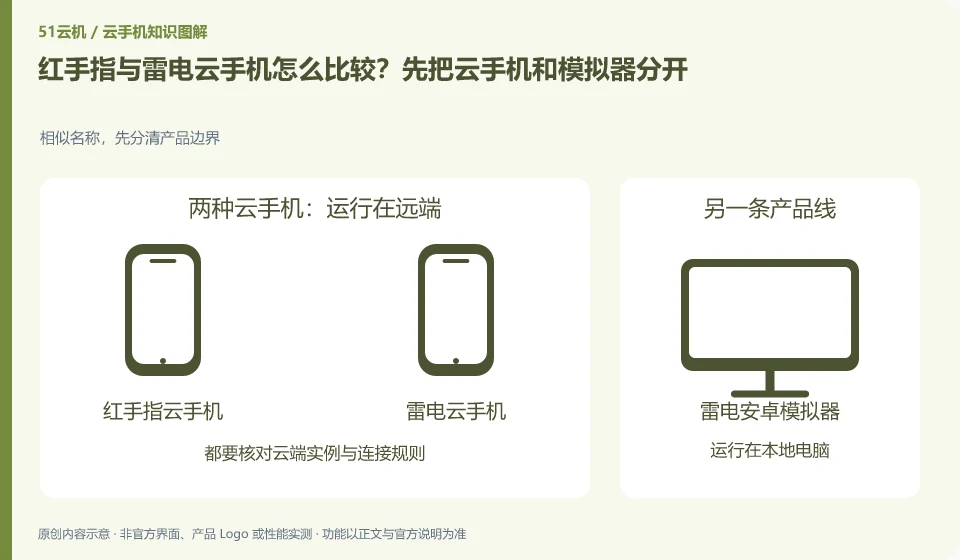
When comparing Redfinger and LD Cloud Phone, first write down "Do you need an Android environment that still exists after the computer is turned off, or an emulator that takes advantage of the performance of the machine?" and don't rush to judge who is better. This article does not give rankings that have not been tested, nor does it regard the official website promotion figures as the same conditions; the output of the comparison is a difference table and a set of pilot steps that can continue to be verified.
Define a consistent comparison scope
The local emulator mainly uses your computer to run the Android environment, while cloud phone places the running environment remotely. The need to continue running after shutting down the computer is not the same requirement as the need for low-cost offline development. The selection should be based on the running location and dependency conditions.
Keyboard, clipboard, file upload, sound, and multi-window capabilities may differ between clients. If the device cannot be found after cross-end, it may also be related to account channel, region or device filtering. First verify whether the same device can appear, and then check the target functions to avoid buying another environment by mistake.
What each product's public documentation establishes
| Items to check | Redfinger | LD Cloud Phone |
|---|---|---|
| Product positioning | Redfinger provides cloud phone remote control and application hosting services. | LD Cloud Phone provides remote cloud phone and multi-terminal access portal. |
| Verify entrance | https://www.gc.com.cn/ | https://www.ldyuncs.com/ |
| Conditions that need to be confirmed | Different clients and system packages may be suitable for different functions; the performance promotion on the official website is not regarded as actual measurement results. | LDPlayer and LD Cloud Phone are not of the same operating location; overseas lines cannot be directly equivalent to domestic packages. |
| Scope of evidence on this site | Public official information; no performance tests under matching conditions | Public official information; no performance tests under matching conditions |
Use the same real demand for comparison
Suppose you need an Android environment that still exists after the computer is shut down, or an emulator that takes advantage of native performance. First fix the application version, usage period and local access device, and then select a small number of environments that meet the basic conditions on both sides. If the systems or packages provided by both parties cannot be aligned, the differences should be recorded truthfully instead of writing the test results as the overall pros and cons of the brand.
When accepting the application, focus on "confirming whether the task must continue after the machine is shut down", and also check "the two entrances point to the same device and meet the required input functions". Each product records success steps, failure prompts and data exports; if there is no available trial or current sales evidence on any side, it should be kept for verification instead of being completed based on search articles.
You can follow the comparison order
- Write the necessary items into a list, compare only the abilities required for this task, and confirm the account and opening qualifications first.
- Write down whether the task must continue after the machine is shut down and note the data retention period.
- Use the same account to search for the same device and check the area and device number.
- Complete a task according to the same process, check reconnection, file export and permission withdrawal, not only observe whether the home page can be opened.
- Record the costs, data rules and failed items; unsuitable plans will be exited according to the current rules and the data will be retained.
How should this group of products form a different conclusion?
This group is more likely to be misled by the name. Redfinger's products and functions help focus on remote cloud machines, while the Thunderbolt brand allows users to connect to cloud phones and local emulators at the same time. If you still want to keep the environment after turning off the computer, the comparison object must be the cloud products on both sides, rather than directly ranking the monthly rental of one side and the local running performance of the other side.
Next, the actual access and application are compared: Redfinger checks the installation and restart according to the corresponding client help, and Raiden confirms the device and account range according to the domestic or overseas stations. Neither side has the performance results under the same conditions in this article, so the frame rate promoted on the official website cannot be used instead. If the task is allowed to be completed entirely on the local machine and the local simulator can still be independently evaluated, that is already another type of resource selection and does not belong to the conclusion of the victory or defeat of the two cloud phones in this article.
Source and update scope
- Redfinger official information 1
- Redfinger official information 2
- Redfinger official information 3
- Redfinger official information 4
- LD Cloud Phone official information 5
- LD Cloud Phone official information 6
- LD Cloud Phone official information 7
Data verification: October 26, 2026. This article is a method of organizing and comparing AI-assisted public information. It is not a hands-on testing evaluation. It does not provide fictitious prices, search volumes, market shares and performance scores.
Continue reading:cloud phone knowledge portal · Brand information directory。
Related questions to explore
- What is Redfinger? Where it runs, how to access it and who it serves
- Installing Redfinger's client versus installing APKs in the cloud phone
- Redfinger restart versus factory reset: check your data first
Back to the brand and product knowledge directory · Browse cloud phone topics