
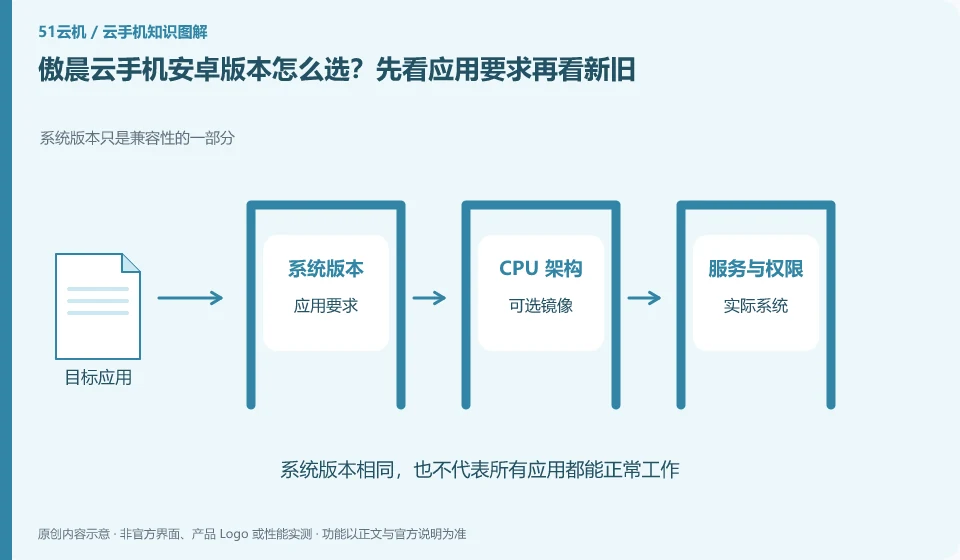
Regarding Aochen cloud phone, the key to this issue is: newer Android versions may support new application interfaces, but may also change permissions and background behaviors; older versions may be compatible with legacy applications, but are not suitable for tasks that require a new system. The choice should be based on the target application version and complete process, rather than simply chasing the latest.
Known information about Aochen cloud phone and the key points of this verification
Aochen cloud phone official website provides Android, computer and web page operation portals. The official question page explains that the cloud runs independently and reminds you of data processing if your subscription has not been renewed or the device has been replaced.
There may be a time difference between the system range on the official website and the current console options. The records are based on the actual model purchased. The old range is not considered to be sold in full quantity.
The evidence boundary of this article is: the system version and package are subject to the actual console; the old version range on the website does not represent all current devices.
How this issue applies to this product
The system ranges on Aochen's official website and old FAQs cannot automatically represent all available models of the current console. When facing different versions of information, save the page time and product range first, and then confirm in the actual selection; this article does not rewrite the historical range into an unverified current sales encyclopedia.
Application adaptation is more important than the pursuit of digital newness and oldness. When the installation package states that a certain version of the system is required, first confirm that the selected environment meets the requirements, and then check the login, files and peripherals; some functions will also be affected by the application's own policies, and meeting the minimum system is not a full-process guarantee. To switch to another system, you should first read the data rules for the switching device and export the local content. When the drafts and settings in the original device are not independently backed up, it is not advisable to continuously change devices for the experimental version to avoid losing problem evidence and personal data.
When retaining the old environment, also consider that its application may stop supporting the old system in the future. Being able to run today is just the current condition, and it is more reliable to review the necessary software requirements regularly; allow backup and testing time when migration is needed, rather than looking for an exit after the system is forced to change.
Understand what this question covers
The system range listed on the official website may not be available in every package, and the old tutorial may not be updated. Record the selected image and model before creation, and check it in the system settings after creation. If changing the system involves rebuilding the environment, the file should be exported first. It cannot be assumed that the application and login status will be automatically migrated.
Check in this order
- Compile the minimum system and service dependencies from the official application instructions.
- Check the available images for the current package and check the actual version after creation.
- Verify login, permissions and core processes before saving selection records.
Sources and scope
Sources checked on October 26, 2026. This article combines AI-assisted research of public information with independent analysis and verification suggestions; we have not conducted a hands-on test of this product. Features and costs depend on the current official documentation and your order.
Continue reading:Cloud phone basics · Cloud phone troubleshooting guide · Brand reference directory。
Related questions to explore
- Aochen web access: website, sign-in page and console are different
- Aochen subscription expiry: plan renewal and file export separately
- Aochen APK upload failed: verify the package rather than trying unknown downloads
Back to the brand and product knowledge directory · Browse cloud phone topics