
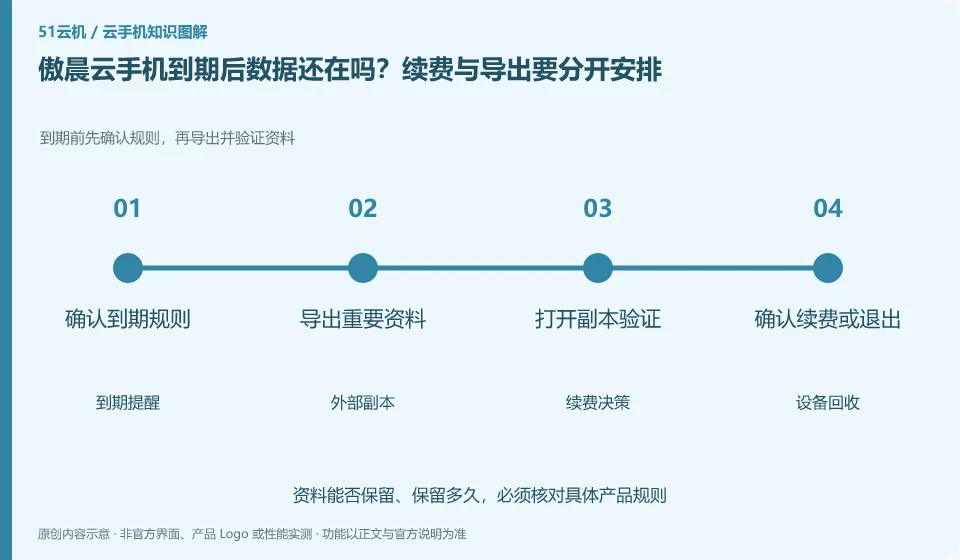
Regarding Aochen cloud phone, the key to this issue is: do not interpret being able to renew before expiration as meaning that there is an infinite recovery window after expiration. Cloud Phone is a leased environment with a life cycle, and local files, application login status, and the device itself may be affected by recycling rules.
Known information about Aochen cloud phone and the key points of this verification
Aochen cloud phone official website provides Android, computer and web page operation portals. The official question page explains that the cloud runs independently and reminds you of data processing if your subscription has not been renewed or the device has been replaced.
The official question page clearly mentions the data processing for non-renewal and device replacement, so export it first, and then arrange for renewal or exit.
The evidence boundary of this article is: the system version and package are subject to the actual console; the old version range on the website does not represent all current devices.
How this issue applies to this product
Aochen FAQ lists non-renewal expiration and device replacement as data situations that need attention. When reading such instructions, you need to ask clearly whether the action affects the validity period, device identity, or the Android environment; the user's initiative to change devices may also make the original local data no longer available, so you cannot just focus on the expiration reminder.
If you plan to keep a tool environment for a long time, you can create a record for each file, application account, and platform order. Files must be readable outside the cloud machine, accounts must have available retrieval channels, and orders must be directed to the correct device. If the processing rules prompted by the current interface are different from those on the old problem page, save the differences and ask support before deciding on the action. This article does not have a guaranteed unified recovery window, so it does not write "it will definitely be restored within a few days after expiration", nor does it regard automatic renewal as a file backup.
After backup, you can extract a copy of the most important files and open them on other devices to check whether they are the latest content. If you only see the name of the exported file, you may still get a blank document or an old copy; whether the data is available requires actual reading and confirmation, and cannot be judged solely by the original cloud machine still having a bright screen.
Understand what this question covers
Content that needs to be retained for a long time should be stored in a location that you can access independently. Listing the expiration date, automatic renewal status, and data export time on the same list will be more reliable than temporary operations when receiving reminders. The disposal capacity after recycling is subject to the current rules of the product and customer service confirmation.
Check in this order
- Check the expiration date, recycling instructions and auto-renewal status on your order.
- Export non-regenerable files in advance and check whether the backup copy is complete.
- Save order records after deciding to renew or exit to avoid operating on the wrong device.
Sources and scope
Sources checked on October 26, 2026. This article combines AI-assisted research of public information with independent analysis and verification suggestions; we have not conducted a hands-on test of this product. Features and costs depend on the current official documentation and your order.
Continue reading:Cloud phone basics · Cloud phone troubleshooting guide · Brand reference directory。
Related questions to explore
- Aochen web access: website, sign-in page and console are different
- Choosing an Aochen Cloud Phone Android version for your apps
- Aochen APK upload failed: verify the package rather than trying unknown downloads
Back to the brand and product knowledge directory · Browse cloud phone topics