
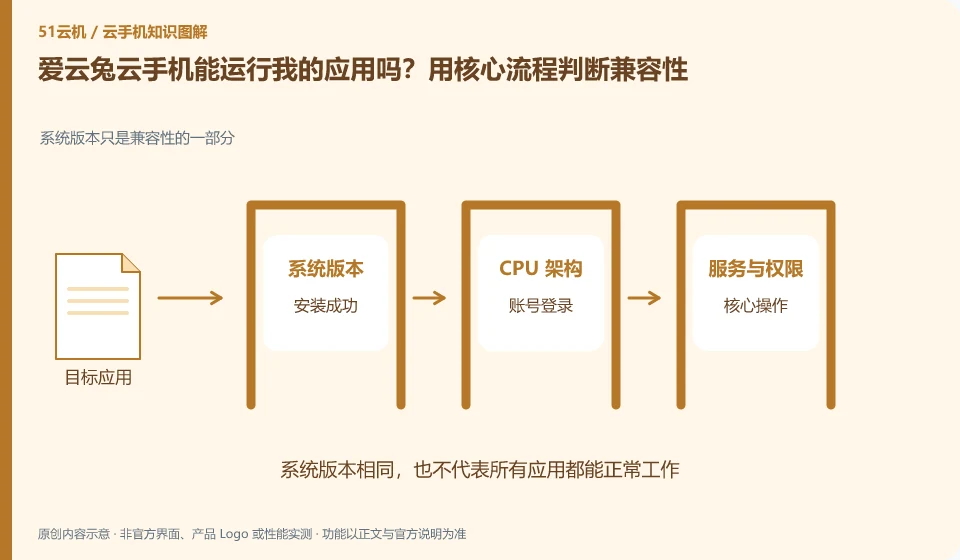
Regarding Aiyuntu cloud phone, the key to this question is: being able to install it does not mean that it can complete the task. To determine compatibility, you must at least cover startup, login, key operations, sounds or peripherals, and reconnection after disconnection; if you only look at the homepage that can be opened, it is easy to miss the restrictions that appear when you are actually using it.
Known information about Aiyuntu cloud phone and the key points of this verification
Aiyuntu official website introduces ARM server and container Android virtualization solutions. The official FAQ differentiates between hosting and remote viewing traffic, and provides instructions on authorization, failure, and expiration.
Some old specifications on the help page may be inconsistent with current application requirements. Complete your own core process testing after recording the actual device system.
The evidence boundaries of this article are: the help page version span is large; the free rights, models and recovery time must be reviewed in the current order.
How this issue applies to this product
The time span between AiyuntuFAQ and early developer materials is worth noting. The system and model descriptions in the old page may not meet the minimum requirements for today's applications; Haima Cloud's early data points to experience channels, which does not mean that all functions of the current client will remain the same. When selecting, you need to record the Android version of the actual allocated device and the client used.
Testing can revolve around a process that must be completed, such as importing learning materials, annotating and exporting. If the application fails to start, first check the official distribution package and system requirements; if the remote operation is not smooth, then check the access screen and network. When an application relies on capabilities such as a local camera, it should be made clear that this is another validation project. This article does not obtain evidence that any application is compatible, nor does it extend the general advice in the help pages to apply to all new versions.
It is also valuable to save success conditions for later compatibility testing, such as client, system, and application versions. When any subsequent update introduces changes, you can retest based on this record, instead of just remembering what was "available" at the time; you can also use this to determine what to retest before upgrading or replacing a device.
Understand what this question covers
Apps may rely on Android version, processor architecture, system services, device sensors, or account policies. The vendor says it is compatible with mainstream applications and cannot replace the verification of specific versions. Only by recording the complete version number and error report during testing can you determine whether the problem comes from the installation package, the environment, or the application itself.
Check in this order
- List the actions that must be completed and label dependencies such as camera, positioning, and notifications.
- Run the complete process in a single test environment and save the actual error prompts.
- Retest against another system or configuration and confirm the success conditions before purchasing long-term.
Sources and scope
Sources checked on October 26, 2026. This article combines AI-assisted research of public information with independent analysis and verification suggestions; we have not conducted a hands-on test of this product. Features and costs depend on the current official documentation and your order.
Continue reading:Cloud phone basics · Cloud phone troubleshooting guide · Brand reference directory。
Related questions to explore
- Why does viewing Aiyuntu use data when background cloud hosting does not?
- Managing Aiyuntu device sharing: ownership and access withdrawal
- Aiyuntu subscription expiry: plan renewal and file export separately
Back to the brand and product knowledge directory · Browse cloud phone topics