
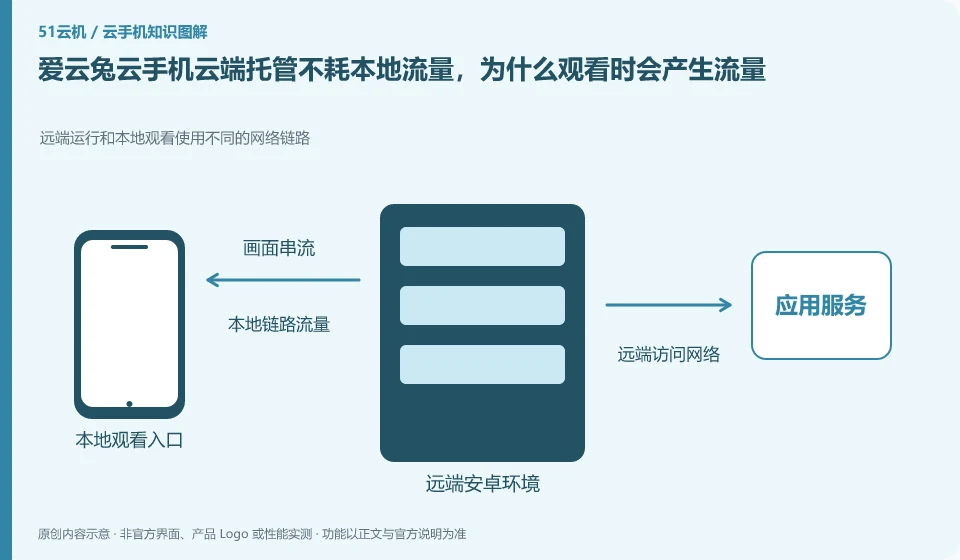
Regarding Aiyuntu cloud phone, the key to this problem is: when hosting, the application runs in the cloud; when the control interface is opened, the local needs to receive video, sound and upload operations. Therefore, "hosting consumes no local traffic" cannot be understood to mean that viewing and control also consume zero traffic. The two states must be separated.
Known information about Aiyuntu cloud phone and the key points of this verification
Aiyuntu official website introduces ARM server and container Android virtualization solutions. The official FAQ differentiates between hosting and remote viewing traffic, and provides instructions on authorization, failure, and expiration.
The official FAQ explains hosting and operation traffic separately. The article focuses on understanding the status differences and does not provide unified hourly traffic figures.
The evidence boundaries of this article are: the help page version span is large; the free rights, models and recovery time must be reviewed in the current order.
How this issue applies to this product
AiyuntuFAQ explains the hosting status separately from the actual remote operation traffic. This distinction is more useful than looking for a fixed answer to "how much does a cloud phone consume per hour?": applications in the cloud machine can run remotely, and once the user views the screen and transmits input, he or she participates in a real-time connection locally.
When preparing to view over a cellular network for a long time, first use your own client to count a fixed task, and then try different image qualities or viewing durations; the same product cannot guarantee that everyone will get the same consumption. The historical model and current image quality settings of the web help may be different, and the old data is not directly applied. Exporting images and APKs locally will also result in file transfers and should be recorded separately. Saving traffic can start by reducing unnecessary viewing, but this does not allow us to omit checking the results of important tasks or regard cloud online as a success.
If the traffic is obviously abnormal, first check whether you are exporting files, watching highly changing images, or running other local applications at the same time. The total amount of system statistics is not necessarily generated by cloud phone. Only by recording according to specific clients and time periods can we discuss whether our viewing plan needs to be adjusted.
Understand what this question covers
To determine the source of traffic, first look at the client traffic statistics in the mobile phone system, and then distinguish between viewing, uploading files and local downloads. Downloading applications within the cloud and importing cloud files back to the local computer are not the same direction. When you need to save traffic, you can prioritize using WiFi and reduce unnecessary long previews.
Check in this order
- Record the client traffic and network used before viewing.
- Perform viewing and file transfers for short periods of time to observe changes individually.
- Adjust image quality and viewing frequency based on actual results to avoid applying uniform consumption.
Sources and scope
Sources checked on October 26, 2026. This article combines AI-assisted research of public information with independent analysis and verification suggestions; we have not conducted a hands-on test of this product. Features and costs depend on the current official documentation and your order.
Continue reading:Cloud phone basics · Cloud phone troubleshooting guide · Brand reference directory。
Related questions to explore
- Managing Aiyuntu device sharing: ownership and access withdrawal
- Aiyuntu subscription expiry: plan renewal and file export separately
- Aiyuntu screen lag: start with the smallest change
Back to the brand and product knowledge directory · Browse cloud phone topics