
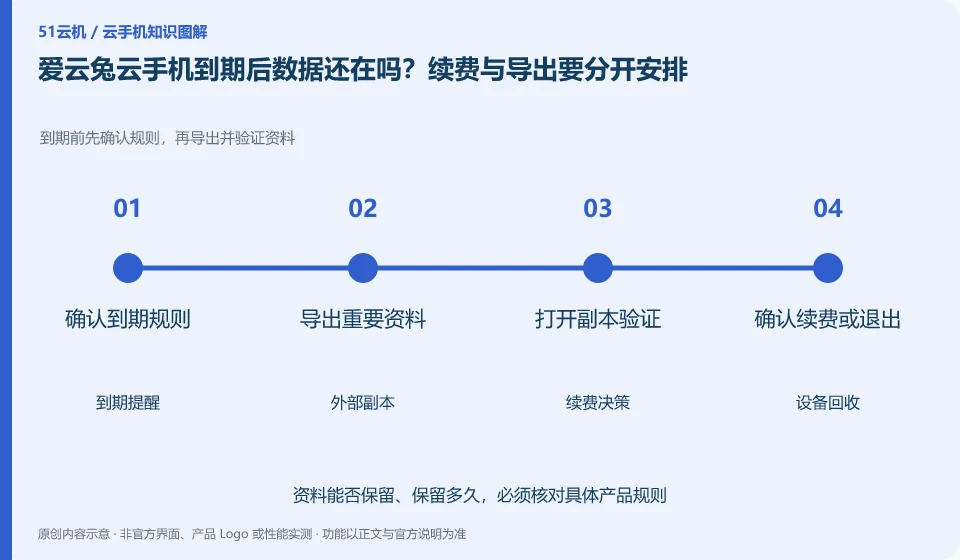
Regarding Aiyuntu cloud phone, the key to this issue is: don’t think that being able to renew before it expires means that there is still an infinite recovery window after expiration. Cloud Phone is a leased environment with a life cycle, and local files, application login status, and the device itself may be affected by recycling rules.
Known information about Aiyuntu cloud phone and the key points of this verification
Aiyuntu official website introduces ARM server and container Android virtualization solutions. The official FAQ differentiates between hosting and remote viewing traffic, and provides instructions on authorization, failure, and expiration.
The help page has clear reminders on expiration processing, but the page version may change. The specific window is subject to the current order rules, and there is no promise of recovery.
The evidence boundaries of this article are: the help page version span is large; the free rights, models and recovery time must be reviewed in the current order.
How this issue applies to this product
Expiration processing instructions can be found in AiyuntuFAQ, but the help pages span different versions. The most valuable way to read it for current users is to treat the old documents as risk reminders, and then go back to this order to check the equipment expiration, renewal and resource recovery conditions. Graceful descriptions presented in the past do not automatically extend to every model of today.
If you are only hosting an Android task for a short period of time, you should first confirm whether the task results have been synchronized to the target application before ending, instead of just checking that the cloud machine is still online. The screenshots and documents that need to be taken away are saved separately; the account data within the application is verified through the application itself. If an empty list appears after expiration, sort out the platform account channels and original equipment records first, and don’t rush to buy another one to “retrieve” it. New equipment can usually only provide new running space, and the ability to recover old data must be confirmed by current official rules.
If you use the authorized assistance function, you must also inform the relevant personnel of the access arrangements before expiration. The facilitator can enter and not change the resource life cycle, and should not be allowed to keep the only backup on his behalf; after the end, the person in charge of the equipment will still check whether the documents, orders, and authorizations have been properly processed.
Understand what this question covers
Content that needs to be retained for a long time should be stored in a location that you can access independently. Listing the expiration date, automatic renewal status, and data export time on the same list will be more reliable than temporary operations when receiving reminders. The disposal capacity after recycling is subject to the current rules of the product and customer service confirmation.
Check in this order
- Check the expiration date, recycling instructions and auto-renewal status on your order.
- Export non-regenerable files in advance and check whether the backup copy is complete.
- Save order records after deciding to renew or exit to avoid operating on the wrong device.
Sources and scope
Sources checked on October 26, 2026. This article combines AI-assisted research of public information with independent analysis and verification suggestions; we have not conducted a hands-on test of this product. Features and costs depend on the current official documentation and your order.
Continue reading:Cloud phone basics · Cloud phone troubleshooting guide · Brand reference directory。
Related questions to explore
- Why does viewing Aiyuntu use data when background cloud hosting does not?
- Managing Aiyuntu device sharing: ownership and access withdrawal
- Aiyuntu screen lag: start with the smallest change
Back to the brand and product knowledge directory · Browse cloud phone topics