
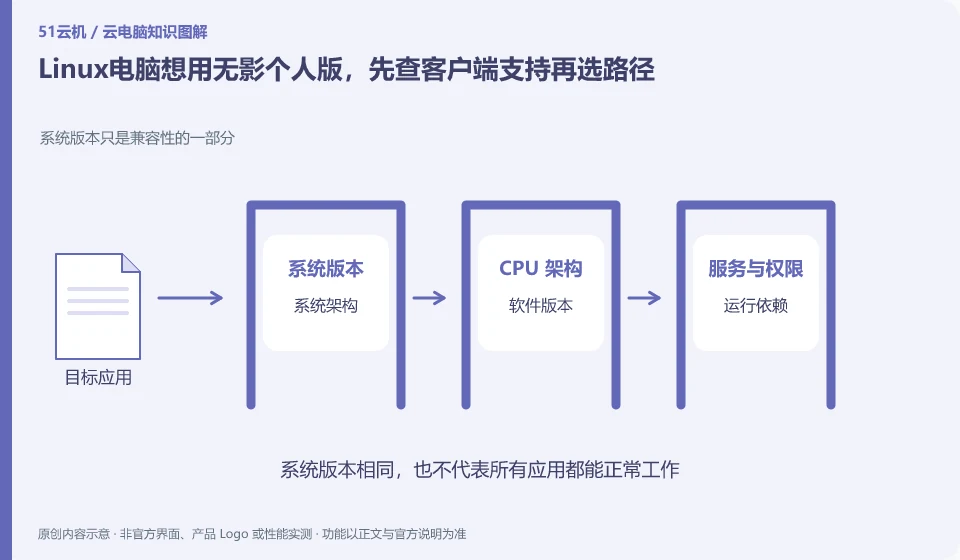
First check the current personal version support matrix. The official document queried this time states that the personal version does not have a Linux installation package, and provides web page connection ideas; this is the version and query time information, and subsequent changes should be subject to the official page.
Who this is for:General readers and small teams who are working on Alibaba Wuying Cloud PC and need to solve the specific problems in the title. Data verification date: 2026-10-26.
First, identify the product line
The Alibaba Cloud Help Center separates Wuying Personal and Enterprise Edition: the Personal Edition focuses on daily use by individuals and families, while the Enterprise Edition focuses on the security and unified operation and maintenance of organizations. The personal version document also explains the package, client and web access separately, so you must check the version first when looking for a tutorial.
Installing software and completing a workflow are different tests
If you are running Linux locally, first confirm that the browser and input method can complete the actual tasks, and then check the audio and file export. Do not use installation packages from other Wuying versions or third-party download pages to pretend to be personal Linux clients; if you must use peripherals, you should continue to check the support conditions.
Software compatibility includes the operating system, processor architecture, permissions, drivers, licensing and data dependencies. A successful installation only confirms that the installation step worked. You still need to test launching, signing in, reading and writing files, and producing the required output. For domestic operating systems, older programs or software requiring special hardware, start with the vendor's support matrix rather than someone else's screenshot.
Create an application list, specifying the name, version, licensing method, dependent components and acceptance actions. Prioritize verification of core procedures that affect the business, and then deal with non-essential tools. If the application does not allow a virtualized environment or requires a local encryption device, it should be confirmed with the software vendor and desktop service provider at the same time. Do not use cracking, changing driver signatures, or bypassing authorization to determine "compatibility."
Check each requirement for your task
- Document software version, operating system, architecture, and licensing requirements.
- Check the current desktop and application official support matrix.
- Verify startup, login, data reading and writing and final output, and record failed links.
Not all capabilities of browser connections are created equal
First test the six types of actions: login, Chinese input, copy and paste, full screen, sound and file upload. The browser may intercept some shortcut keys, or the meeting may be silent because the site permissions do not allow open microphone. If you encounter problems, you should check site permissions and official recommended clients, and do not turn off global security settings at will. Sign out of accounts and sessions before leaving a public computer, clean up downloaded work files, and avoid saving passwords.
Where the conclusion applies and what to do next
The accounts, purchase methods, strategies and billing units of the personal, enterprise and commercial versions may be different. It is not appropriate to use screenshots of one version to guide another version.
This article is based on public information. We have not purchased or tested the product. The scenarios describe ways to verify suitability, not customer case studies. Features and terms depend on the current official documentation for the relevant version.
Official sources and further reading
- Frequently Asked Questions about Wuying Personal Purchase: Official explanation of personal and enterprise version positioning and purchase FAQs.
- Log in and configure Wuying Personal client: List the personal version client platform and Web client instructions. Platform support will change with the version.
- Wuying Personalbilling Instructions: Describes the package, WuyingLingdou credits and resource measurement method, and does not quote the activity price in a fixed way.
Read more:Cloud PC knowledge hub · Find an article for your question · Alibaba Wuying Cloud PC product line identification
Related questions to explore
- Alibaba Wuying personal or enterprise edition: compare management needs
- What are Wuying Lingdou credits? Separate plans, runtime and disk costs
- Wuying Cloud PC browser access versus client access: check your workflow
Back to the brand and product knowledge directory · Browse cloud PC topics