
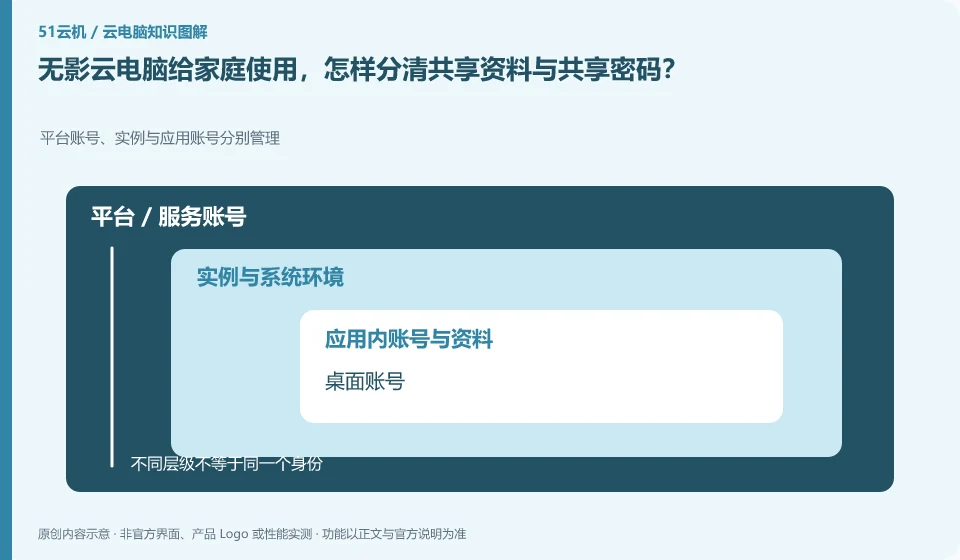
Sharing information among family members does not mean they should share a high-privilege account. Wuying Personal is oriented to individuals and families. For specific multi-person use methods, you still need to check the current rules. At the same time, work, study and personal data are managed separately.
Who this is for:General readers and small teams who are working on Alibaba Wuying Cloud PC and need to solve the specific problems in the title. Data verification date: 2026-10-26.
First, identify the product line
The Alibaba Cloud Help Center separates Wuying Personal and Enterprise Edition: the Personal Edition focuses on daily use by individuals and families, while the Enterprise Edition focuses on the security and unified operation and maintenance of organizations. The personal version document also explains the package, client and web access separately, so you must check the version first when looking for a tutorial.
Brand accounts, application accounts and device accounts are managed separately
First list who needs to access which files, and give priority to using officially allowed accounts and sharing methods. Different data ranges should be used for children attending classes, parents working, and saving ID cards; do not synchronize browser passwords to a desktop environment that everyone can access.
The cloud PC login account is responsible for accessing the desktop. Office software, game stores or business systems may have their own accounts. Logging out of one account will not automatically log out all other applications, and uninstalling the client does not mean revoking the remote session. Before you prepare to decommission your service or hand over your device, you should check your browser, password storage, app authorization, and device binding one by one.
For personal use, ensure that the retrieved mobile phone number and email address are still valid, while for organizational use, priority should be given to using the identity method approved by the organization. Do not solve login problems by sharing verification codes, buying and selling accounts, or using unofficial remote agents. If you encounter a suspected theft, first follow the official portal to change credentials, revoke sessions, and retain transaction and work order evidence, and then check whether the cloud files have been modified.
Check each requirement for your task
- List three types of accounts: desktop login, application service, and device system.
- Check retrieval channels, authorized devices, and sessions that are still online.
- Exit and revoke authorization item by item before deactivation, and handle exceptions according to official channels.
When organizing public information, we must also control the scope of external dissemination.
Data can be layered into public, internal, and sensitive layers, and available tools, storage times, and export methods can be specified for each layer. Public samples are used for testing. For official use, only the information necessary to complete the task is given, and browser synchronization, clipboard history and shared directories are checked. After the task is completed, clean the temporary copy according to the retention requirements, and retain the business results and audit records that must be saved.
Where the conclusion applies and what to do next
The accounts, purchase methods, strategies and billing units of the personal, enterprise and commercial versions may be different. It is not appropriate to use screenshots of one version to guide another version.
This article is based on public information. We have not purchased or tested the product. The scenarios describe ways to verify suitability, not customer case studies. Features and terms depend on the current official documentation for the relevant version.
Official sources and further reading
- Frequently Asked Questions about Wuying Personal Purchase: Official explanation of personal and enterprise version positioning and purchase FAQs.
- Log in and configure Wuying Personal client: List the personal version client platform and Web client instructions. Platform support will change with the version.
- Wuying Personalbilling Instructions: Describes the package, WuyingLingdou credits and resource measurement method, and does not quote the activity price in a fixed way.
Read more:Cloud PC knowledge hub · Find an article for your question · Alibaba Wuying Cloud PC product line identification
Related questions to explore
- Alibaba Wuying personal or enterprise edition: compare management needs
- What are Wuying Lingdou credits? Separate plans, runtime and disk costs
- Wuying Cloud PC browser access versus client access: check your workflow
Back to the brand and product knowledge directory · Browse cloud PC topics