
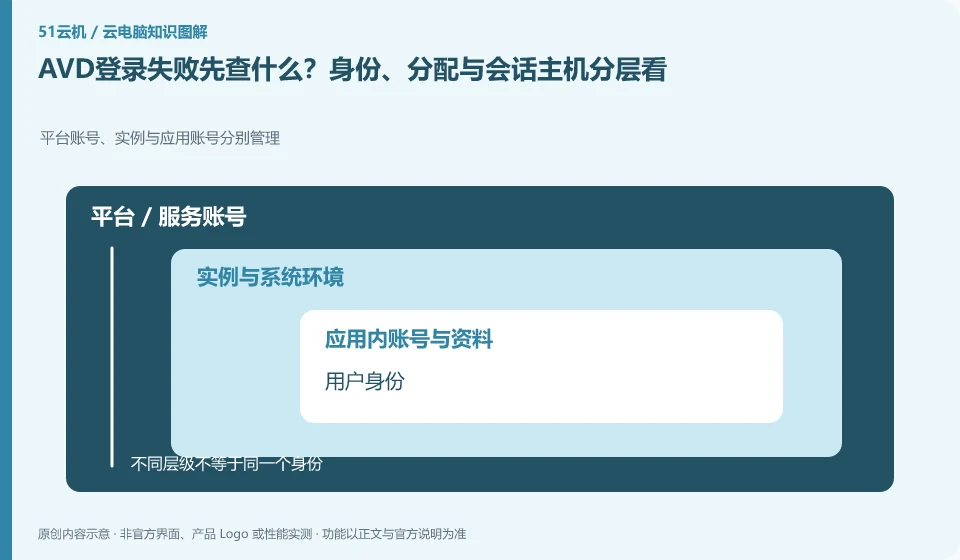
AVD troubleshooting should separate authentication, resource authorization and session connections. The official prerequisites emphasize the identity system. You cannot just reset the password or create a virtual machine again when the connection cannot be connected.
Who this is for:General readers and small teams who are working on Microsoft Azure Virtual Desktop and need to solve the specific problem in the title. Data verification date: 2026-10-26.
First, identify the product line
Azure Virtual Desktop can deliver a complete desktop or RemoteApp, and administrators need to plan host pools, application groups, users, and images. It belongs to the same Microsoft desktop system as Windows 365, but has different resource organization and operation and maintenance responsibilities, so it is suitable for design based on workload.
Check identity, licensing and desktop assignment together
First record whether the error occurred during login, resource list, or entering the desktop stage, and then check the organization, application allocation, and host availability. Network troubleshooting follows the official model and does not open unnecessary inbound ports for convenience; desensitized logs and time points are more helpful than complete passwords.
Successful login does not guarantee an available desktop. Organizing desktops generally also requires users to be assigned to corresponding resources, application groups or workspaces; identity authentication, access authorization and desktop preparation are three things. If you encounter a blank list, first ask the administrator to check the organization and resource allocation to which the account belongs, instead of repeatedly changing passwords or creating multiple new accounts.
It is recommended to use a role list to record what resources are needed by ordinary employees, temporary collaborators and administrators. Minimum permissions are granted when you join the company, resources are adjusted when you are transferred, and sessions are recycled and legally saved work materials are handed over when you leave. Test accounts should be isolated from production identities, and automated scripts should avoid using personal high-privilege credentials. This upgrades "can log in" to "access only approved work environments."
Check each requirement for your task
- Check the account organization, identity source and current login subject.
- Check to see if the user is covered by a resource, app group, or desktop assignment.
- Verify with a general authority account and record the recycling actions of onboarding, transfer and resignation.
Cakes should be located hierarchically by link
If the picture is blurry but the mouse is slow, first observe the bit rate and image quality; if the operation is late but the picture is clear, pay attention to the delay and jitter; if only large files are uploaded slowly, check the upload path and bandwidth. Only change one variable at a time, for example, first change Wi-Fi to wired. Do not change nodes, adjust resolution, and reinstall the client at the same time. It is easier to get an effective answer by submitting the steps to reproduce the problem to official support than by simply saying "the configuration is not working".
Where the conclusion applies and what to do next
Do not copy the old tutorial of the classic version of Azure Virtual Desktop; Microsoft's overview document has given a reminder to retire the classic version, and you should check the current resource model.
This article is based on public information. We have not purchased or tested the product. The scenarios describe ways to verify suitability, not customer case studies. Features and terms depend on the current official documentation for the relevant version.
Official sources and further reading
- Azure Virtual Desktop overview: Official description of complete desktop, RemoteApp, personal and pooled resources and classic version retirement information.
- Azure Virtual Desktop prerequisites: Identity, platform, and deployment prerequisites reference.
- Azure Virtual Desktop Documentation Entry: Current documentation and quick start portal, without borrowing steps from other desktop products.
Read more:Cloud PC knowledge hub · Find an article for your question · Microsoft Azure Virtual Desktop product line identification
Related questions to explore
- Azure Virtual Desktop host pools, application groups and workspaces explained
- AVD personal versus pooled desktops: does the environment need to persist?
- AVD RemoteApp versus a full desktop: publish only what is needed
Back to the brand and product knowledge directory · Browse cloud PC topics