
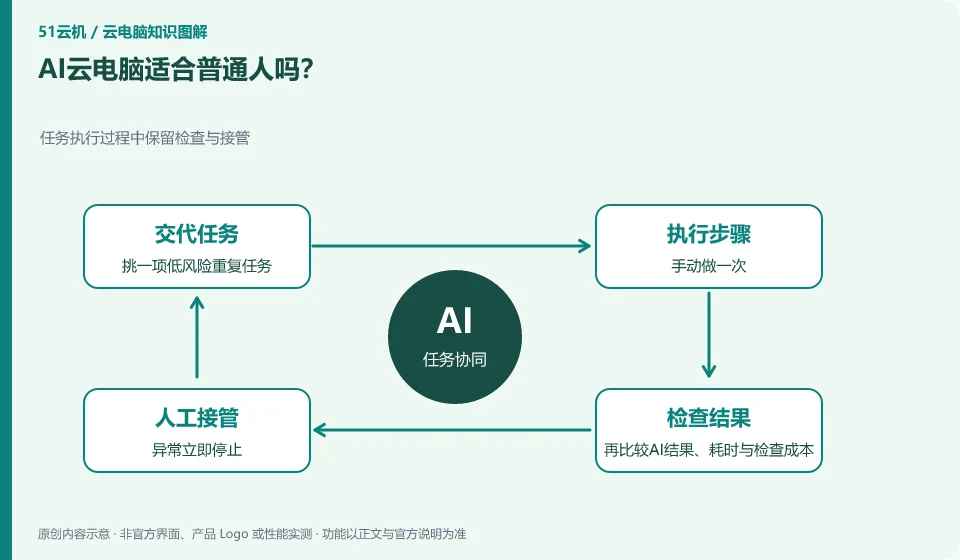
If you have repetitive, clear, and easy-to-check tasks, you can experience it on a small scale; if the goal is not yet clear, it is more helpful to learn the manual process first.
Understand the essentials
Only by knowing what the correct result is can we judge whether the AI is doing the right thing, rather than just watching it move the mouse many times.
A practical example
Here’s a hypothetical example: Organizing weekly practice notes into a fixed format is often a better way to get started than tackling a complex contract for the first time.
What to check or try
- Pick a low-risk repetitive task.
- Do it manually once.
- Then compare the AI results, time-consuming and inspection costs.
You can first let AI explain the process or generate a draft to be checked before trying limited operations. The better you know what the results should be, the easier it is to spot anomalies. Tasks that are low-frequency and difficult to accept are not necessarily worth the cost of automated configuration and ongoing maintenance.
An easy-to-miss detail
Don’t pay to upgrade just because of the new feature name, first confirm whether it really solves your problem.
Continue reading
- What does giving an AI assistant its own cloud PC mean?
- Can you train a large AI model directly on a cloud PC?
Back to Cloud PCs: AI and ongoing use
Notes and further reading
Anthropic computer use announcement;Windows 365 for Agents technical information。
This introductory guide was prepared by 51Yunji from public information with AI-assisted drafting. Examples are hypothetical, not hands-on product tests or promises of results. Follow the current product, version and official instructions for specific features and procedures. Compiled on October 26, 2026.