
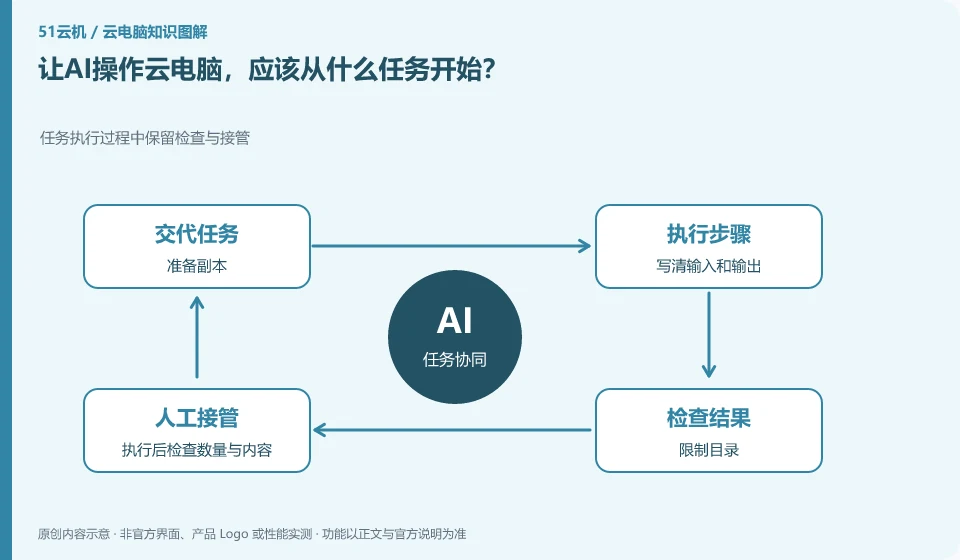
Start with small tasks that are low-risk, checkable, and undone, such as organizing a test file or generating a practice sheet with rules.
Understand the essentials
The more specific the task, the easier it is to judge success and failure; processes involving real submissions increase the burden of inspection.
A practical example
Here’s a hypothetical example: Let AI archive synthetic data by date, making it easier to check than processing formal reimbursements the first time around.
What to check or try
- Prepare copies.
- Write input and output clearly.
- Restricted directories.
- Check the quantity and content after execution.
- Keep the original material.
It's better for the first mission to have a correct answer that you can check manually. For example, you can complete the sample by yourself first for sorting and totaling the synthesis table. The AI output is checked according to the same standards, rather than being considered correct just because it is explained in detail. Once successful, gradually increase the complexity.
An easy-to-miss detail
Don’t treat making payments, deleting unique originals, or sending important data as first-time tasks.
Continue reading
- How is an AI assistant different from the cloud PC it runs on?
- AI file organization on a cloud PC: avoiding accidental deletion
Back to Cloud PCs: AI and ongoing use
Notes and further reading
Anthropic computer use announcement;Windows 365 for Agents technical information。
This introductory guide was prepared by 51Yunji from public information with AI-assisted drafting. Examples are hypothetical, not hands-on product tests or promises of results. Follow the current product, version and official instructions for specific features and procedures. Compiled on October 26, 2026.