
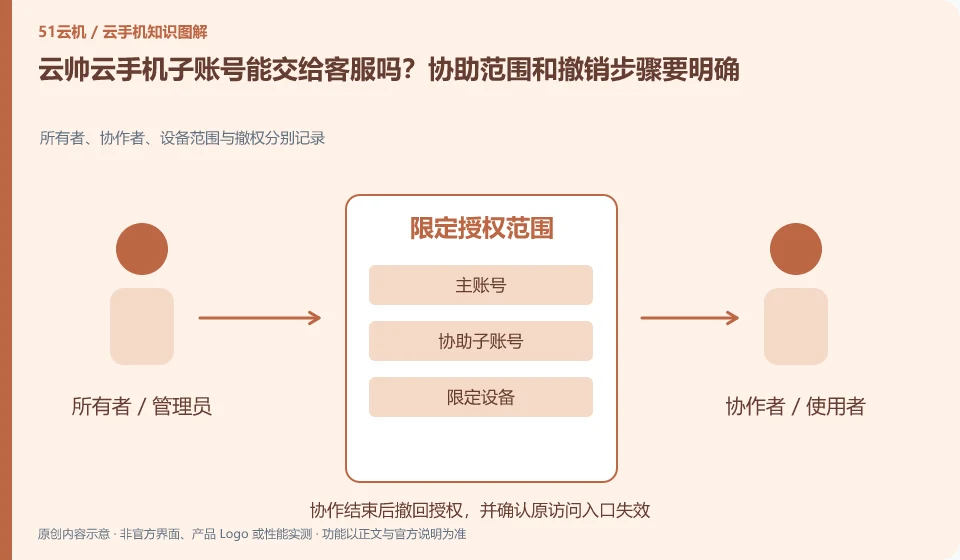
Regarding Yunshuai cloud phone, the key point of this issue is: if the sub-account or assistance function is available, it should only be used to identify the device and identify the fault, and should not be used as a tool to safely resell the account. Before granting access, understand what you can see, what you can modify, and how to reclaim your master account.
Known information about Yunshuai cloud phone and the key points of this verification
Yunshuai cloud phone is operated by Shanghai Yunshuai Information Technology Co., Ltd. The official website introduces three-end access, preview and batch operations; the protocol explains that remote viewing will generate local network traffic.
The user agreement places the use of sub-accounts in the scope of collaborative exception handling, etc. Read the current agreement before use and do not package it as a risk-free transaction method.
The evidence boundaries of this article are: the old maintenance announcement on the official website cannot be regarded as a current incident; sub-account assistance and personal account resale need to be distinguished.
Consider a specific scenario
Let's say you're going to need support to have temporary access to a test environment. This is a verification plan, not our experience using this product. First of all, "the identity of the object, the scope of assistance and the withdrawal entrance have been confirmed" as the completion standard for this time. The original information should be saved before the test, and the first attempt should not be placed directly on important accounts and unique file copies.
What is most easily overlooked in this scenario is that temporary assistance does not mean that offline transactions on the main account can be safely conducted. Therefore, it is necessary to separate the status that can be seen on the interface from the results that really need to be delivered. Being able to reproduce, explain and withdraw is more valuable than getting only one success notification.
Check in this order
- Confirm that the assistance recipient comes from official support channels and limit the problem and device.
- Reproduce in an environment that does not contain sensitive data and check the authorized visibility range.
- Get assistance immediately after the problem is over and check device settings and application authorization.
How to submit records to the support channel of Yunshuai cloud phone
When submitting a question, first write "Can the Yunshuai cloud phone sub-account be handed over to customer service? The scope of assistance and cancellation steps must be clear", and then attach the device number, selected client and system version, failure steps and the current time. The key point of verify in the brand information is that "the user agreement places the use of sub-accounts in the scope of collaborative handling of exceptions, read the current agreement before use, and does not package it as a risk-free transaction method." Therefore, do not just send a screenshot of the homepage, nor do you need to put the complete password, verification code or private key in the problem description. When it comes to order or business qualifications, you should contact support from the official entrance where this product can be verified.
Understand what this question covers
Temporary assistance may also access files and login status in cloud apps. Provide the minimum necessary environment, hide irrelevant notifications, and record the start and end time of assistance. The risk description in the official agreement needs to be read, especially to prevent third parties from pretending to be customer service to ask for verification codes and main account passwords.
A reusable verification log
You can copy the table below into your notes. Record the device ID, verification date and current version. It helps identify which step failed and lets you repeat the same checks after changing clients or services.
| Checkpoint | What counts as a pass | What to do if it fails |
|---|---|---|
| Identity scope | User, administrator and facilitator identities are clearly defined | When the identity of the other party cannot be verified, do not hand over the main account or verification code |
| Access scope | Only the equipment and content required for this mission will be released | If you can only open the entire environment, remove irrelevant data before making a decision. |
| actual behavior | Use a test account to verify visible and actionable content | When the configuration name does not match the actual behavior, the scope will be tightened based on the actual results. |
| End recycling | After withdrawing, try access again to confirm that the permissions have indeed expired. | While the old session is still valid, continue to check the session and application-side authorization, not just change the name. |
Sources and scope
Sources checked on October 26, 2026. This article combines AI-assisted research of public information with independent analysis and verification suggestions; we have not conducted a hands-on test of this product. Features and costs depend on the current official documentation and your order.
Continue reading:Cloud phone basics · Cloud phone troubleshooting guide · Brand reference directory。
Related questions to explore
- Why does viewing Yunshuai Cloud Phone use data when background hosting does not?
- Yunshuai multi-device previews: a normal screen does not prove task completion
- Yunshuai maintenance notices: plan checks after tasks resume
Back to the brand and product knowledge directory · Browse cloud phone topics