
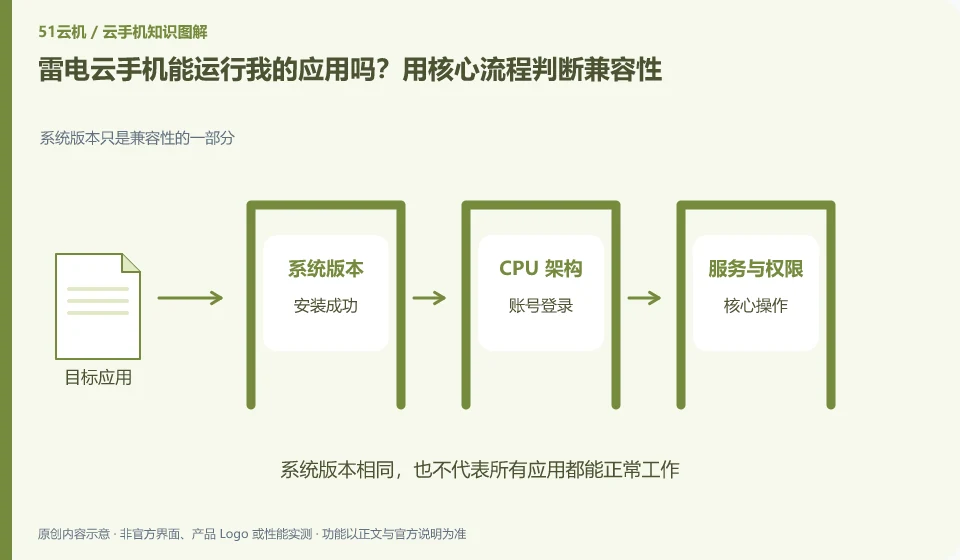
Regarding LD Cloud Phone, the key to this question is: being able to install it does not mean that it can complete the task. To determine compatibility, you must at least cover startup, login, key operations, sounds or peripherals, and reconnection after disconnection; if you only look at the homepage that can be opened, it is easy to miss the restrictions that appear when you are actually using it.
Known information about LD Cloud Phone and the key points of this verification
LD Cloud Phone provides remote cloud phone and multi-terminal access portal. The current official website lists entrances for Windows, Android, Apple, etc., and there are also overseas cloud phone entrances on the webpage.
Do not assume from "cloud native Android" that all applications have passed identity and hardware checks. The application version and login process must be confirmed through actual testing.
The evidence boundaries of this article are: LDPlayer and LD Cloud Phone are not operating in the same location; overseas lines must not be directly equivalent to domestic packages.
How this issue applies to this product
LD Cloud Phone can provide a cloud Android environment, but whether the application accepts this environment is determined by its own system dependencies and account rules. Product descriptions such as "native Android" cannot replace the login, input and file testing of a certain version of a game or learning software. Don't directly interpret the performance on LDPlayer as the compatibility conclusion of the cloud phone version.
You can first list the three steps that the target application must complete, and then choose the currently available system to try: it can be started after installation, the original account can be logged in normally, and the core tasks can be actually submitted. Tasks that require cameras or positioning are marked separately to avoid buying a long-term package just by going to the home page. If it fails, save the complete application version and error message; changing the package multiple times or installing so-called compatibility tools will introduce new variables, which is not conducive to confirming the cause.
When applying for support, you can write whether the failure occurred on the cloud phone or the simulator in the first line, and attach the respective product versions. False positives caused by similar names can lead troubleshooting to error documentation, and accurately identifying the environment can improve the usability of problem descriptions rather than guessing a performance parameter first.
Understand what this question covers
Apps may rely on Android version, processor architecture, system services, device sensors, or account policies. The vendor says it is compatible with mainstream applications and cannot replace the verification of specific versions. Only by recording the complete version number and error report during testing can you determine whether the problem comes from the installation package, the environment, or the application itself.
Check in this order
- List the actions that must be completed and label dependencies such as camera, positioning, and notifications.
- Run the complete process in a single test environment and save the actual error prompts.
- Retest against another system or configuration and confirm the success conditions before purchasing long-term.
Sources and scope
Sources checked on October 26, 2026. This article combines AI-assisted research of public information with independent analysis and verification suggestions; we have not conducted a hands-on test of this product. Features and costs depend on the current official documentation and your order.
Continue reading:Cloud phone basics · Cloud phone troubleshooting guide · Brand reference directory。
Related questions to explore
- LD Cloud Phone versus a local Android emulator: choose for your task
- How to verify the official LD Cloud Phone download
- LD Cloud Phone on mobile, desktop or web: choosing an access method
Back to the brand and product knowledge directory · Browse cloud phone topics