
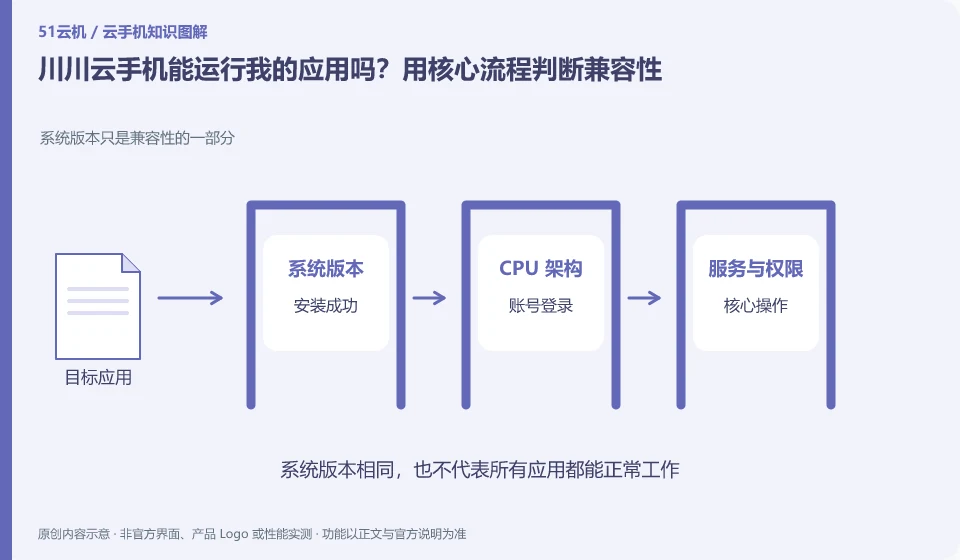
Regarding Chuanchuan Cloud Phone, the key to this question is: being able to install it does not mean that it can complete the task. To determine compatibility, you must at least cover startup, login, key operations, sounds or peripherals, and reconnection after disconnection; if you only look at the homepage that can be opened, it is easy to miss the restrictions that appear when you are actually using it.
Known information about Chuanchuan Cloud Phone and the key points of this verification
The official introduction of Chuanchuan Cloud Phone positions it as an ARM-based cloud Android product. The product introduction includes cloud disk mutual transfer, batch operations, cloud machine authorization and testing, etc.
Promoting coverage of multiple scenarios cannot replace the login and permission testing of the target application; first use your actual application version to complete the process.
The evidence boundary of this article is: the scenarios mentioned on the official website do not guarantee the adaptation of any third-party apps, nor can they guarantee that the account will not be restricted.
How this issue applies to this product
Chuanchuan Cloud’s product introduction covers gaming, office and testing scenarios, and the official website also explains ARM’s technical roadmap. This information explains what tasks the product may carry, but does not prove that all functions of an application have been adapted. The software versions, CPU architecture requirements, system services and physical hardware dependencies that need to be tested should be listed separately.
If you want to put a document tool on Chuanchuan Cloud, first prepare the file through the currently available entrance, then verify editing, exporting and reopening; if it is a game, check the login, control and progress, rather than just compare the screen opening speed. The official website mentions local capability calls, which also need to be checked one by one with the terminal being used. When encountering a failure, first distinguish the upload path and application operation. Do not attribute all abnormalities to low configuration because of the wide range of product scenarios, and do not use ROOT as a general solution.
Applications that require cloud disk transfer must separately check whether the input material can be read by the target software. Successful network transmission and passing application compatibility are different evidences, and the results are written separately in the report; if only one import link is missing, do not generally evaluate the entire environment as incompatible with all software.
Understand what this question covers
Apps may rely on Android version, processor architecture, system services, device sensors, or account policies. The vendor says it is compatible with mainstream applications and cannot replace the verification of specific versions. Only by recording the complete version number and error report during testing can you determine whether the problem comes from the installation package, the environment, or the application itself.
Check in this order
- List the actions that must be completed and label dependencies such as camera, positioning, and notifications.
- Run the complete process in a single test environment and save the actual error prompts.
- Retest against another system or configuration and confirm the success conditions before purchasing long-term.
Sources and scope
Sources checked on October 26, 2026. This article combines AI-assisted research of public information with independent analysis and verification suggestions; we have not conducted a hands-on test of this product. Features and costs depend on the current official documentation and your order.
Continue reading:Cloud phone basics · Cloud phone troubleshooting guide · Brand reference directory。
Related questions to explore
- Chuanchuan cloud storage and cloud phones: two file-transfer checks
- Starting Chuanchuan Cloud Phone batch management: names, groups and checks
- Chuanchuan screen sharing for teaching: viewing versus control permissions
Back to the brand and product knowledge directory · Browse cloud phone topics