
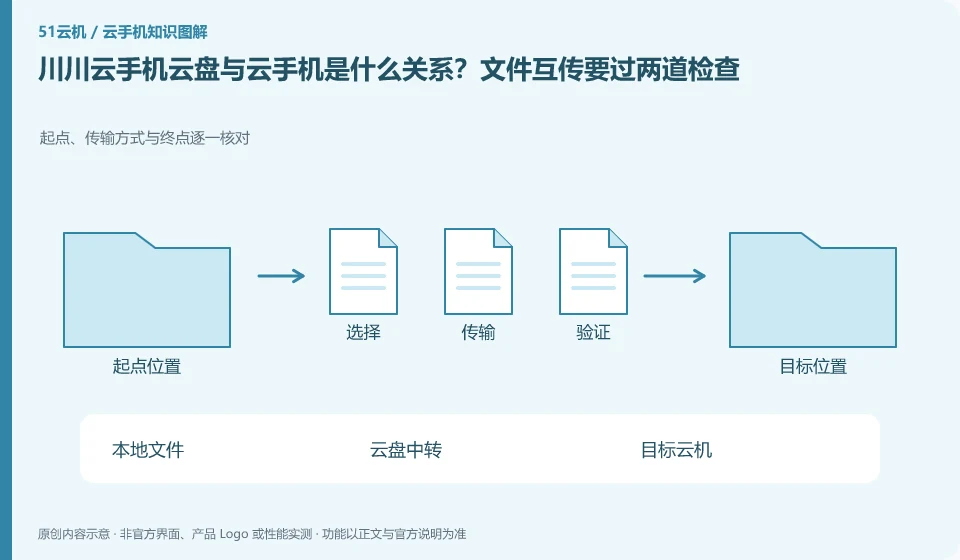
Regarding Chuanchuan Cloud Phone, the key to this issue is: the cloud disk is used to transfer or save files, and the cloud phone is used to run Android applications; seeing files in the cloud disk does not mean that the target cloud phone has been downloaded or installed. After the file is transferred, you still need to check the actual results in the cloud file management or target application.
Known information about Chuanchuan Cloud Phone and the key points of this verification
The official introduction of Chuanchuan Cloud Phone positions it as an ARM-based cloud Android product. The product introduction includes cloud disk mutual transfer, batch operations, cloud machine authorization and testing, etc.
The introduction of cloud disk mutual transfer on the official website only explains the existence of such capabilities. The specific file format, capacity and path must be verified with the current entrance.
The evidence boundary of this article is: the scenarios mentioned on the official website do not guarantee the adaptation of any third-party apps, nor can they guarantee that the account will not be restricted.
Understand what this question covers
Organizing file names, types and versions before uploading materials can reduce misinformation of similar files. The subsequent processing of APK, pictures, and documents is different: APK needs to be installed, pictures may need to be imported into the album, and documents need to be opened in the corresponding application. When synchronization is interrupted, confirm the completed part first to avoid repeated space occupation.
Consider a specific scenario
Suppose you are going to put a course PDF into the Android reader through the transfer space. This is a verification plan, not our experience using this product. First of all, "the file can be opened on the target cloud machine and the version is correct" should be regarded as the completion standard for this time. The original data should be saved before the test, and the first attempt should not be placed directly on important accounts and unique file copies.
The most easily overlooked thing in this scenario is that the completion of uploading to the transit space does not mean that the reader has received the file. Therefore, it is necessary to separate the status that can be seen on the interface from the results that really need to be delivered. Being able to reproduce, explain and withdraw is more valuable than getting only one success notification.
Check in this order
- First use a small file without sensitive content to verify the local to cloud disk path.
- Download and open it on the target device, and confirm the file version and directory.
- Then upload a formal document to record the storage location of the cloud disk copy and cloud machine copy.
A reusable verification log
You can copy the table below into your notes. Record the device ID, verification date and current version. It helps identify which step failed and lets you repeat the same checks after changing clients or services.
| Checkpoint | What counts as a pass | What to do if it fails |
|---|---|---|
| input file | Source, version, type and target use can correspond | If the file is unknown, verify the original source first and do not replace it with an unknown modification package. |
| intermediate process | Upload and download have progress or completion status respectively | When interrupted, check the completed part first to avoid repeatedly transmitting the same batch of content. |
| Target location | See the file on the correct device and in the correct directory | Check the direction and filter when it cannot be found, and do not rush to delete the source file and try again. |
| Usage results | The target application can read, and the quantity is consistent with the version | If the reading fails, check the format and permissions first, and keep the original until the migration is completed. |
How to submit records to Chuanchuan Cloud Phone support channel
When submitting a question, first state "What is the relationship between Chuanchuan Cloud Phone cloud disk and cloud phone? File transfers must go through two checks." Then attach the device number, selected client and system version, failure steps, and current time. The key point of verify in the brand information is "The official website cloud disk mutual transfer introduction only shows the existence of such capabilities. The specific file format, capacity and path must be verified with the current entrance." Therefore, do not just send a screenshot of the homepage, nor do you need to put the complete password, verification code or private key into the problem description. When it comes to order or business qualifications, you should contact support from the official entrance where this product can be verified.
Sources and scope
Sources checked on October 26, 2026. This article combines AI-assisted research of public information with independent analysis and verification suggestions; we have not conducted a hands-on test of this product. Features and costs depend on the current official documentation and your order.
Continue reading:Cloud phone basics · Cloud phone troubleshooting guide · Brand reference directory。
Related questions to explore
- Starting Chuanchuan Cloud Phone batch management: names, groups and checks
- Chuanchuan screen sharing for teaching: viewing versus control permissions
- Will my app work on Chuanchuan Cloud Phone? Test its essential workflow
Back to the brand and product knowledge directory · Browse cloud phone topics