
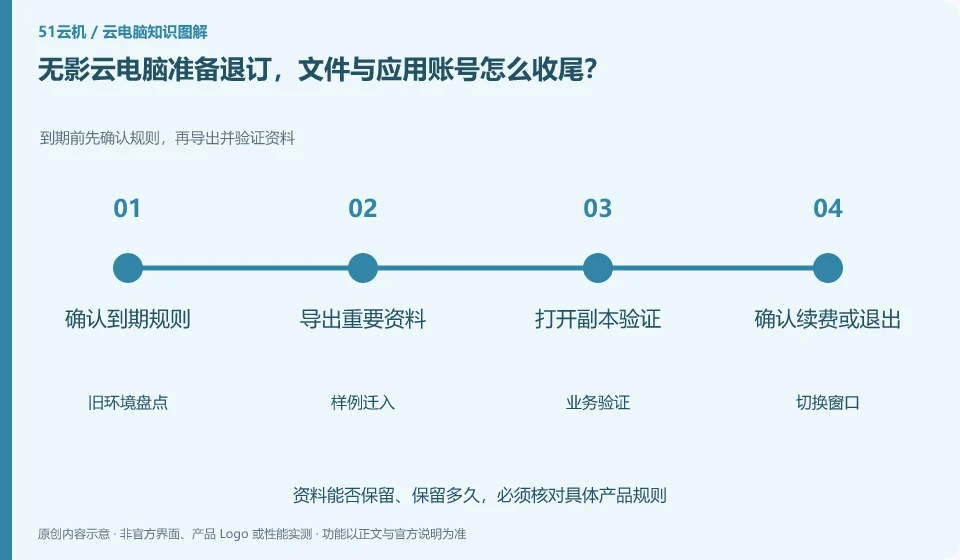
Before unsubscribing, export data according to the current rules, and then process application authorization, renewal and resource end. The end of the package, disk retention and desktop release may be different actions. The migration cannot be considered completed just by logging out of the account on the client side.
Who this is for:General readers and small teams who are working on Alibaba Wuying Cloud PC and need to solve the specific problems in the title. Data verification date: 2026-10-26.
First, identify the product line
The Alibaba Cloud Help Center separates Wuying Personal and Enterprise Edition: the Personal Edition focuses on daily use by individuals and families, while the Enterprise Edition focuses on the security and unified operation and maintenance of organizations. The personal version document also explains the package, client and web access separately, so you must check the version first when looking for a tutorial.
Migration requires an old environment that can be returned to
Organize documents, codes, browser bookmarks and legally transferable configurations, and verify that they are readable in the new environment. Deauthorize application devices that are no longer needed and check the ongoing resources in the bill; the old environment can only be cleaned according to rules after the recovery verification is completed.
When migrating from a local computer or another service, the old environment should not be deleted initially. First, take inventory of applications, data, accounts, peripherals, and authorizations, and then copy the transferable data to the test environment. System images can help restore the environment, but different hardware, virtualization platforms, and software licenses may not allow direct migration; the official migration methods of the source and target platforms must be found out.
It’s easier to spot problems with two rounds of verification: the first to check the process with a sample, and the second to check the results with a real, approved working copy. The frozen content and the content that can still be modified in the migration window should be clear to avoid version conflicts caused by editing on both sides. After the switch is successful, keep the necessary rollback time, confirm that the data is complete, and then clean up the old resources according to the retention policy.
Check each requirement for your task
- Inventory applications, entitlements, data locations, and configurations that must be retained.
- First move in a copy of the sample and verify the output, dependencies, and peripherals.
- Agree on switching windows and rollback conditions, and process the old environment after confirming the data.
Whether the backup is valid depends on the recovery
Prepare a small recovery drill: export the documentation, a project with dependencies, and the directory listing to an approved location and open it in another environment. Verify content, file names, permissions, and app versions, and record where to restore from, who performed the restore, and who to contact if the restore fails. Practice usage examples and do not delete production data to verify recovery capabilities.
Where the conclusion applies and what to do next
The accounts, purchase methods, strategies and billing units of the personal, enterprise and commercial versions may be different. It is not appropriate to use screenshots of one version to guide another version.
This article is based on public information. We have not purchased or tested the product. The scenarios describe ways to verify suitability, not customer case studies. Features and terms depend on the current official documentation for the relevant version.
Official sources and further reading
- Frequently Asked Questions about Wuying Personal Purchase: Official explanation of personal and enterprise version positioning and purchase FAQs.
- Log in and configure Wuying Personal client: List the personal version client platform and Web client instructions. Platform support will change with the version.
- Wuying Personalbilling Instructions: Describes the package, WuyingLingdou credits and resource measurement method, and does not quote the activity price in a fixed way.
Read more:Cloud PC knowledge hub · Find an article for your question · Alibaba Wuying Cloud PC product line identification
Related questions to explore
- Alibaba Wuying personal or enterprise edition: compare management needs
- What are Wuying Lingdou credits? Separate plans, runtime and disk costs
- Wuying Cloud PC browser access versus client access: check your workflow
Back to the brand and product knowledge directory · Browse cloud PC topics