
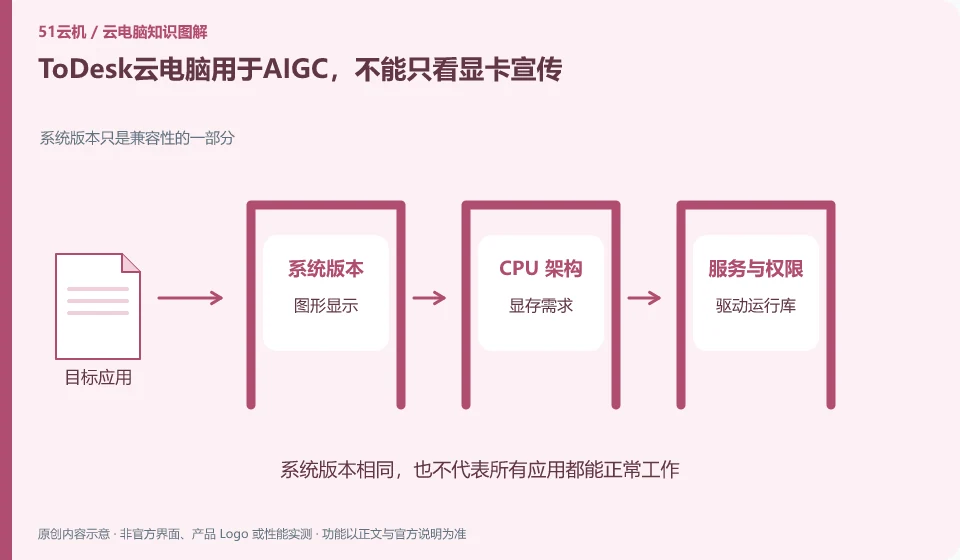
The availability of AIGC depends on the specific software, VRAM, driver, data and package terms. ToDesk provides an independent cloud PC entrance, but the display and peripheral promotion of the remote control performance version cannot automatically prove that the cloud PC has the same computing conditions.
Who this is for:For general readers and small teams who are working on ToDesk cloud PC, need to solve the specific problem in the title. Data verification date: 2026-10-26.
First, identify the product line
ToDesk's official help center has novice guidance on cloud PC purchase, connection, and package viewing. The download center also lists remote control and cloud PC as different entrances. The former connects to existing devices, and the latter provides a cloud computer that can be connected after purchase; the billing and data locations of the two products must be judged separately.
There are usage conditions after the GPU name.
Write down whether you want to run a web page generation tool, desktop authoring software, or a local model. Use public samples to complete one generation and export and record the running environment; model downloads and long-term tasks also need to check storage, session rules and permissions, and cannot just test remote screens.
Tasks that require graphics cards should be split into graphics display, video encoding, three-dimensional calculations, and model inference. Being able to stream the game screen to the mobile phone does not mean that you can install the specified driver on the desktop, call CUDA or occupy the entire GPU for a long time. Checking whether the product provides a complete desktop, whether the VRAM meets the task, and whether the driver and runtime version are compatible is more reliable than just looking at the name of the graphics card series.
Design and AI work should be verified using small samples: open a representative project or run a public small model, record whether it can be started, VRAM occupation, output correctness and result export. Do not regard the vendor demo frame rate as your own test results, and do not upload business models or customer materials to desktops that have not yet confirmed authorization. For continuous rendering tasks, you also need to confirm whether session timeout and resource release will interrupt the operation.
Check each requirement for your task
- Confirm the VRAM, system, driver and licensing requirements of the target software.
- Check whether your current plan explicitly opens up the required graphics or computing power.
- Use the public sample to make a complete output, record the resource usage and export the results.
AI capabilities differentiate between assistants, reasoning and automatic operations
Start with low-risk tasks, such as organizing public materials, working with non-private copies of forms, or generating document inventories. Let the agent give a plan first, and reserve manual inspection before writing, deleting, submitting and paying actions. Record the model, tools, inputs, and outputs to determine whether the error is caused by prompts, software interface changes, or permissions. When customer materials are involved, the data processing scope and unit approval status of the model service must also be checked.
Where the conclusion applies and what to do next
ToDesk official FAQ 137 prompts that cloud PC resources will be recycled after exiting and should be backed up in time; if the actual package has additional storage arrangements, the current rules must still prevail. Remote control free rights cannot be automatically applied to the cloud PC package.
This article is based on public information. We have not purchased or tested the product. The scenarios describe ways to verify suitability, not customer case studies. Features and terms depend on the current official documentation for the relevant version.
Official sources and further reading
- ToDesk cloud PC Newbie Guide: The official document explains how to create a new cloud desktop, select a package, connect to the purchased cloud PC and check the expiration time.
- ToDesk cloud PC official download page: cloud PC and personal and enterprise remote control are separated in the download center; the entrance can distinguish product lines.
- ToDesk official website: Remote control product information; used to identify the boundary between remote control and cloud PC, without borrowing rights across products.
- ToDesk cloud PC official FAQ 137: The main agent verify's official FAQ clearly prompts cloud PC resource recovery and timely backup after exiting; this agent's independent crawling times out, and the rules are reviewed according to the current specific package.
Read more:Cloud PC knowledge hub · Find an article for your question · ToDesk cloud PC product line identification
Related questions to explore
- ToDesk remote control versus ToDesk Cloud PC: what is the difference?
- Getting connected to ToDesk Cloud PC: follow the official setup flow
- Are ToDesk Cloud PC plans and remote-control memberships interchangeable?
Back to the brand and product knowledge directory · Browse cloud PC topics