
Centralized desktops still require ongoing operations and maintenance. Who is responsible for the platform, images, business software, personnel permissions, and terminals should be explained before going online, rather than distinguishing the boundaries between suppliers and internal IT after a failure occurs.
Who this is for:General readers and small teams who are researching SangforaDesk desktop cloud and need to solve the specific problem in the title. Data verification date: 2026-10-26.
First, identify the product line
SangforaDesk official information introduces the desktop delivery solution consisting of desktop cloud platform and cloud terminal, and discusses computing, storage virtualization and centralized operation and maintenance. Its typical purchasing target is organizations, and it cannot directly apply the recharge and startup logic of personal cloud PCs.
Validate a small deployment before scaling up
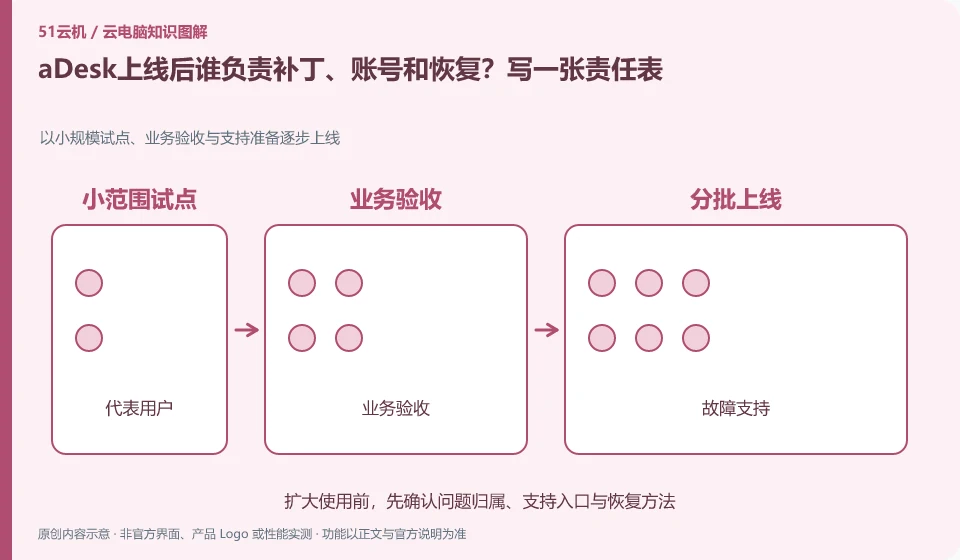
List daily updates, personnel entry and exit, backup checks and work order responses, and assign responsibilities and replacement personnel respectively. Practice an ordinary user seeking help and data recovery to confirm the support path; temporary manual processing in a small number of pilots cannot replace the process in the long term.
Bringing the organization's desktop online is a business switch, not just installing the client. First select a group of representatives including ordinary office workers, heavy users of peripherals and different network conditions, and record the steps they take to complete the task. The pilot should clearly define the responsible person, work order entry, rollback plan and shutdown window; the acceptance criteria come from whether the work is completed, not how many functions are listed on the promotional page.
Divide problems into three categories: must be solved, acceptable, and need for subsequent optimization. For example, the core business system cannot be used due to online blocking, and the difference in a certain uncommon shortcut key may be solved through training. Before scale expansion, account recycling, patches, image updates, capacity, and backup and recovery must be checked. In particular, the manual firefighting methods in the pilot phase must not be regarded as long-term operation and maintenance processes.
Check each requirement for your task
- Select representative pilot users and record real work tasks.
- Set acceptance criteria, fault classification, support responsibilities, and fallback conditions.
- Go online in batches after passing business and recovery verification, and keep problem tracking records.
Apply security controls to accounts and data permissions
You can make a permission list and divide the work into three categories: must be allowed, require approval, and prohibited. Ordinary users should not use the administrator account to complete all daily operations, and the access of temporary collaborators must have an expiration time. If you are just reading the information, it is usually more appropriate to give read-only permissions than write permissions to the entire folder. After a login exception or sharing error occurs, the session and credentials will be recovered first, and then the evidence will be retained and processed along the official process.
Where the conclusion applies and what to do next
The centralized operation of the desktop cloud does not mean that the terminal does not require a network, nor does it mean that all USB devices, software authorizations and offline tasks are naturally compatible.
This article is based on public information. We have not purchased or tested the product. The scenarios describe ways to verify suitability, not customer case studies. Features and terms depend on the current official documentation for the relevant version.
Official sources and further reading
- Sangfor desktop virtualization VDI product:Official description of centralized desktop, hyper-converged resources and desktop delivery methods.
- aDesk product introduction:Official versioned product description, deployment capabilities must match the actual version.
- Singfu Cloud Product Catalog: The boundary between cloud platform, desktop cloud and other products.
Read more:Cloud PC knowledge hub · Find an article for your question · SangforaDesk desktop cloud product line identification
Related questions to explore
- What makes up Sangfor aDesk? Endpoints, platform and applications
- Comparing aDesk and conventional PCs through full costs and task tests
- aDesk network problems: separate endpoint-to-desktop and desktop-to-app links
Back to the brand and product knowledge directory · Browse cloud PC topics