
First confirm how users access the desktop, and then confirm how the desktop accesses the business system. The link from the terminal to the desktop is different from the link from the desktop to applications and file services. If either side is blocked, it may cause "the desktop is not easy to use".
Who this is for:General readers and small teams who are studying Huawei Cloud Workspace and need to solve the specific problems in the title. Data verification date: 2026-10-26.
First, identify the product line
Huawei Cloud Workspace product documentation defines it as a cloud desktop, and users and administrators have different configuration and management tasks. When enterprises deliver desktops on the cloud, in addition to virtual machine configuration, they should also arrange accounts, networks, desktop policies, and operation and maintenance to form a usable working environment.
Cakes should be located hierarchically by link
Draw the headquarters, branches, business systems and desktop resources as paths, and mark the authentication and approved access channels. When testing, first verify non-sensitive business samples. Do not open all ports to the public network for connectivity; retain reproducible network and time period information and give it to the administrator.
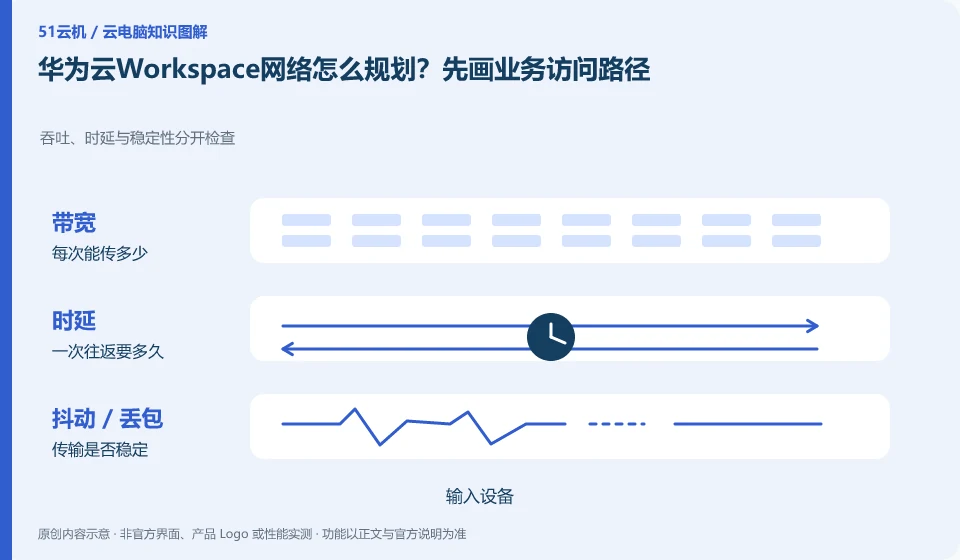
From button pressing to screen return, it includes at least local input, network transmission, cloud processing, encoding and local decoding. A fast download speed test only shows that a certain download link performs better, and cannot alone prove that the cloud desktop interaction is smooth. When diagnosing, fix the image quality and perform the same task, and record wired or Wi-Fi, usage period, nodes, and problem performance separately, so that you can separate a single incidental freeze from a persistent problem.
If the picture is blurry but the mouse is slow, first observe the bit rate and image quality; if the operation is late but the picture is clear, pay attention to the delay and jitter; if only large files are uploaded slowly, check the upload path and bandwidth. Only change one variable at a time, for example, first change Wi-Fi to wired. Do not change nodes, adjust resolution, and reinstall the client at the same time. It is easier to get an effective answer by submitting the steps to reproduce the problem to official support than by simply saying "the configuration is not working".
Check each requirement for your task
- Record the node, network type and time period when the problem occurred under the same task.
- Compare wired vs. Wi-Fi and different image qualities in turn, keeping other conditions unchanged.
- Remove account information before sorting out screen recordings or logs, and then submit reproducible phenomena.
Apply security controls to accounts and data permissions
Saving data in the cloud changes the location of the data and does not automatically eliminate the risk of account compromise, missharing, malware, and accidental deletion. Users should first confirm their login identity, retrieval method, authorized device and session exit; the organization also needs to stipulate who can copy files, install software, open an external network and assign desktops. Encryption or watermarking in promotional materials is just a capability, and the actual effect still depends on the version and configuration.
Where the conclusion applies and what to do next
Huawei Cloud Workspace is not the same delivery method as the desktop mode, ordinary cloud server, and local virtual machine software of Huawei mobile phones.
This article is based on public information. We have not purchased or tested the product. The scenarios describe ways to verify suitability, not customer case studies. Features and terms depend on the current official documentation for the relevant version.
Official sources and further reading
- Huawei Cloud: What is cloud desktop:Officially defines Workspace cloud desktop and explains the positioning of enterprise desktop delivery.
- Huawei Cloud Desktop Administrator User Guide: Administrator resource, user and policy operation reference; subject to the corresponding regional console and version.
- Huawei Cloud desktop product introduction: Background information on desktop product capabilities and network isolation.
Read more:Cloud PC knowledge hub · Find an article for your question · Huawei Cloud Workspace product line identification
Related questions to explore
- Huawei Cloud Workspace versus a cloud server: what is the difference?
- Huawei Cloud Desktop: what do administrators and users each manage?
- Copy and paste blocked on Huawei Cloud Desktop: check policies first
Back to the brand and product knowledge directory · Browse cloud PC topics