
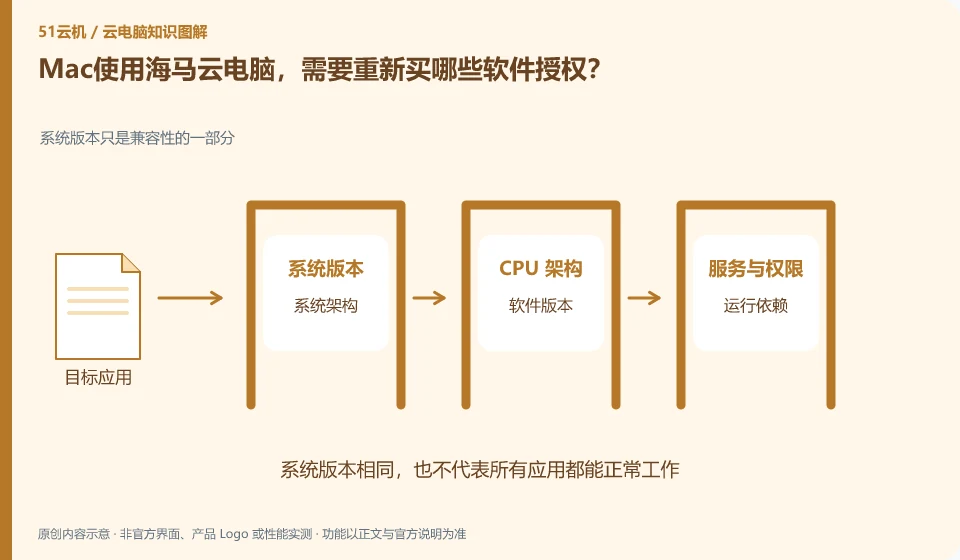
Providing a Windows environment in the cloud does not automatically include all the commercial software licenses you need. The Haima Help Center introduces Mac connection and software usage directions. Users should also check whether specific software is allowed to be activated and used in this environment.
Who this is for:Regular readers and small teams who are working on Haima Cloud PC, need to solve the specific problem in the title. Data verification date: 2026-10-26.
First, identify the product line
Haima Cloud's GPUaaS platform lists cloud gaming, cloud PC, and cloud phone as different forms; the Haima Cloud PC help center also introduces clients, image quality settings, personal hard drives, and file transfers. When choosing products, you must distinguish between personal use portals and developer-oriented SDK and OpenAPI services.
Installing software and completing a workflow are different tests
First list the licenses for office suites, design programs and plug-ins, distinguishing between account subscriptions and device binding authorizations. Use legal samples to verify opening, exporting and fonts, and then consider migrating the work; check whether the cloud device activation needs to be deactivated before ending use.
Software compatibility includes the operating system, processor architecture, permissions, drivers, licensing and data dependencies. A successful installation only confirms that the installation step worked. You still need to test launching, signing in, reading and writing files, and producing the required output. For domestic operating systems, older programs or software requiring special hardware, start with the vendor's support matrix rather than someone else's screenshot.
Create an application list, specifying the name, version, licensing method, dependent components and acceptance actions. Prioritize verification of core procedures that affect the business, and then deal with non-essential tools. If the application does not allow a virtualized environment or requires a local encryption device, it should be confirmed with the software vendor and desktop service provider at the same time. Do not use cracking, changing driver signatures, or bypassing authorization to determine "compatibility."
Check each requirement for your task
- Document software version, operating system, architecture, and licensing requirements.
- Check the current desktop and application official support matrix.
- Verify startup, login, data reading and writing and final output, and record failed links.
Brand accounts, application accounts and device accounts are managed separately
For personal use, ensure that the retrieved mobile phone number and email address are still valid, while for organizational use, priority should be given to using the identity method approved by the organization. Do not solve login problems by sharing verification codes, buying and selling accounts, or using unofficial remote agents. If you encounter a suspected theft, first follow the official portal to change credentials, revoke sessions, and retain transaction and work order evidence, and then check whether the cloud files have been modified.
Where the conclusion applies and what to do next
Just because the platform can be used in certain scenarios does not mean that every personal package allows continuous hosting, installation of any software, or the provision of the same graphics card.
This article is based on public information. We have not purchased or tested the product. The scenarios describe ways to verify suitability, not customer case studies. Features and terms depend on the current official documentation for the relevant version.
Official sources and further reading
- Haima CloudGPUaaS Product Matrix:Officially distinguishes between cloud gaming, cloud PC, cloud phone and developer-oriented SDK/OpenAPI.
- Haima Cloud PC official website: Describes the application direction of cloud computer interaction and office, gaming, etc.; the page is a dynamic product introduction.
- Haima Cloud PC basic operations: Introduces help topics such as image quality, standby, personal hard drive, file transfer, and multi-terminal use.
Read more:Cloud PC knowledge hub · Find an article for your question · Haima Cloud PC product line identification
Related questions to explore
- Haima cloud PCs, cloud gaming and cloud phones: choosing a product line
- Haima Cloud PC's “My Disk”: check file retention before saving
- Adjusting Haima Cloud PC image quality: clarity, smoothness and data usage
Back to the brand and product knowledge directory · Browse cloud PC topics