
Actions may be sent through screenshot recognition, operation interface, ADB or other supported tools. Which path to use depends on the scenario.
Understand the essentials
"Look at the screen and then click" is just one way, and the interface controls the capabilities and limitations of interacting with images.
A practical example
Take a hypothetical example: a tool can click a button, but it may not be able to read the internal state of the application or confirm the save.
What to check or try
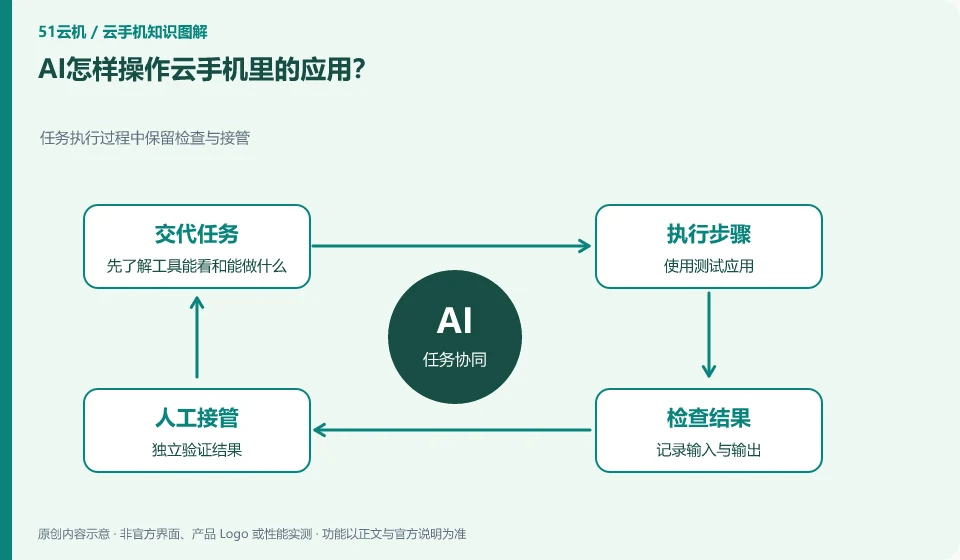
- Start by understanding what the tool can see and do.
- Use a test app.
- Record input and output.
- Independently verify results.
Interface actions do not mean that the business status is known, and conversely, the success of the interface does not guarantee that the interface content meets your expectations. Important tasks can combine two kinds of evidence: action logs show what was done, and application results show what ended up being.
An easy-to-miss detail
Do not regard text appearing on other pages as instructions authorizing the AI to change tasks.
Continue reading
- AI cloud phones and ordinary cloud phones: what is the difference?
- Trying a mobile AI assistant: which task should you start with?
Back to Cloud phones: AI and practical learning
Notes and further reading
Tencent Cloud Phone Computer Use Agent tutorial;AndroidWorld project page。
This introductory guide was prepared by 51Yunji from public information with AI-assisted drafting. Examples are hypothetical, not hands-on product tests or promises of results. Follow the current product, version and official instructions for specific features and procedures. Compiled on October 26, 2026.