
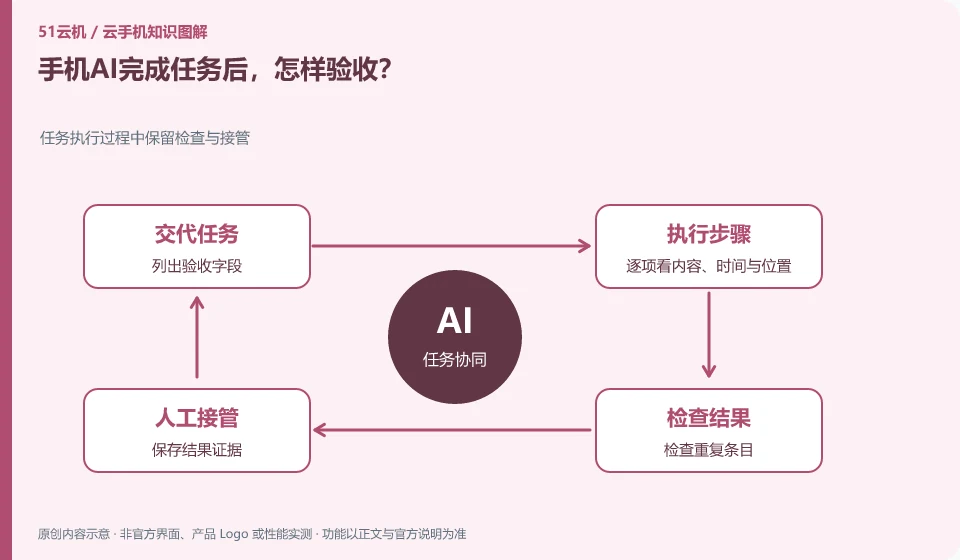
Check the actual status of the application or exported results, not just the AI completion instructions. Reopen the app to check if necessary.
Understand the essentials
The interface showing success may only represent a certain step, and the content, quantity, or target location may still be wrong.
A practical example
Hypothetical example: if a to-do is created but the date is wrong, the task cannot be considered correctly completed.
What to check or try
- List acceptance fields.
- Look at the content, time and location one by one.
- Check for duplicate entries.
- Save evidence of results.
List checkable fields for tasks, such as title, date, quantity, and save location. After comparing each item, decide whether to accept the result. If you need to guess whether the content has been saved, the acceptance method is not clear enough, and more direct evidence should be added.
An easy-to-miss detail
A final screenshot cannot prove that all the intermediate steps and final data are correct.
Continue reading
- Trying a mobile AI assistant: which task should you start with?
- AI taps the wrong thing on a cloud phone: how to take over
Back to Cloud phones: AI and practical learning
Notes and further reading
Tencent Cloud Phone Computer Use Agent tutorial;AndroidWorld project page。
This introductory guide was prepared by 51Yunji from public information with AI-assisted drafting. Examples are hypothetical, not hands-on product tests or promises of results. Follow the current product, version and official instructions for specific features and procedures. Compiled on October 26, 2026.