
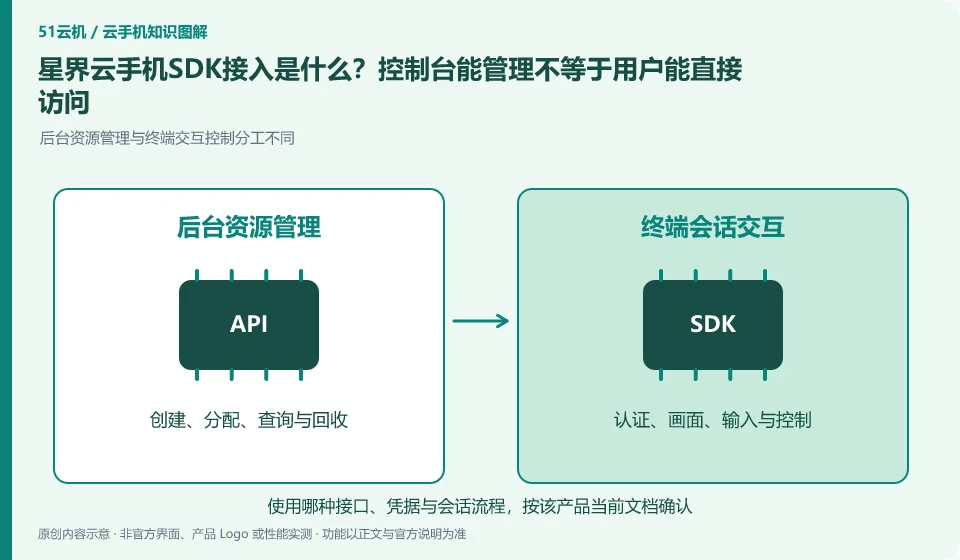
Regarding Xingjie cloud phone, the key to this issue is: the management API is responsible for creating and maintaining resources, and the SDK is responsible for integrating remote control capabilities into your application or web page. The two solve different problems; the ability to create a cloud phone in the background does not mean that the end user already has a login, allocation and control interface.
Known information about Xingjie cloud phone and the key points of this verification
Xingjie cloud phone provides finished product access and open capability documents. The official getting started documentation lists the different clients, shared and dedicated networks, and device management capabilities.
The open capability catalog lists APIs and multi-terminal SDKs. When integrating, first clarify what the backend, client and cloud machine calls are responsible for respectively.
The evidence boundary of this article is: there is a time difference between the system version of the old introductory document and the current product page, and the old document specifications cannot be regarded as current configurations.
How this issue applies to this product
The Xingjie open capability catalog lists open APIs, Web SDKs and Android SDKs. When selecting an entrance, first judge based on the running location: the business background manages resources, the web page or mobile terminal displays and controls the session, and the application in the cloud machine handles its own tasks. Seeing multiple interfaces does not mean that they replace each other or share all permissions.
When preparing to add cloud phone to your own platform, you can first complete a closed loop that does not contain real customer data: the user obtains the correct device through your system, the terminal establishes control, and the session ends after exiting. Replenish reconnection, authorization invalidation and resource recovery processing. The system in the old introduction may be different from the current product page, and the applicable version of the example must be kept on file. This article does not fabricate interface calls or ensure that one integration adapts to all ends; the validity period and role boundaries of credentials should be verified according to the current official instructions, and background secrets must not be directly exposed to the browser.
If the sample is inconsistent with the console phenomenon, record the corresponding version and error stage. First request failure and disconnection after connection should not be combined into one issue; separating them can help determine whether it is background management, terminal session, or cloud application without exposing the real key first.
Understand what this question covers
Authentication, device allocation, session connection and resource release processes should be drawn before access. The server key remains on the server side and the client uses short-lived or restricted access credentials. It also needs to deal with disconnection and reconnection, permission invalidation and device occupation, not just running the sample page.
Check in this order
- Split the responsibilities of backend resource management and front-end control interface.
- Create, assign, connect, and exit the link using the test identity.
- Check for credential exposure, reconnection, and expiration behavior before scheduling formal integration.
Sources and scope
- Xingjie cloud phone product page
- Xingjie cloud phone Getting Started Guide
- Xingjie cloud phone open capabilities
Sources checked on October 26, 2026. This article combines AI-assisted research of public information with independent analysis and verification suggestions; we have not conducted a hands-on test of this product. Features and costs depend on the current official documentation and your order.
Continue reading:Cloud phone basics · Cloud phone troubleshooting guide · Brand reference directory。
Related questions to explore
- Xingjie network problems: local access versus cloud internet
- Choosing Xingjie resolution: text clarity and task coordinates
- Managing Xingjie custom images so test environments can be rebuilt
Back to the brand and product knowledge directory · Browse cloud phone topics