
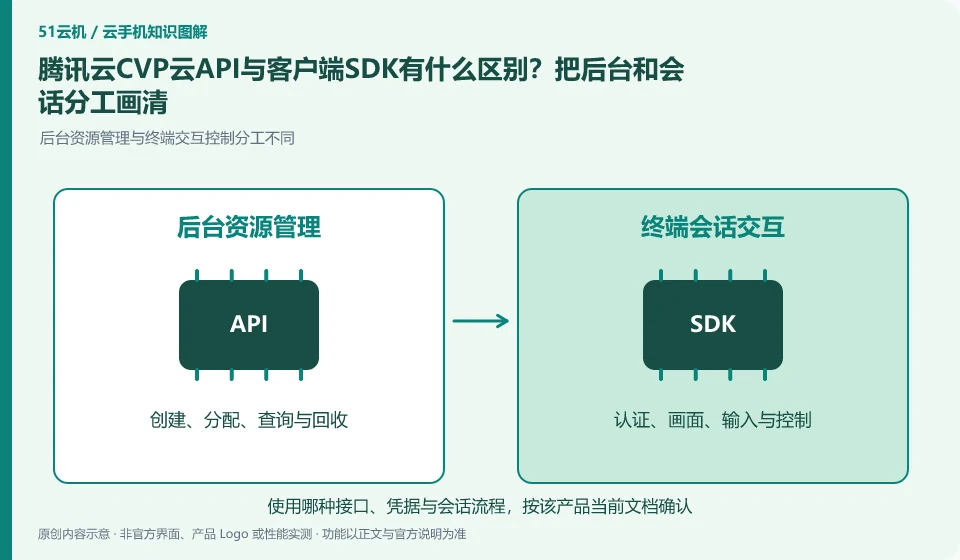
Regarding Tencent CloudCVP, the key to this issue is: the cloud API is usually for background management resources and tasks, and the client SDK is used to connect screens and operations to the terminal. The server can create instances, but the end user still needs authentication, device allocation, and session connection. The two parts cannot replace each other.
Known information about Tencent CloudCVP and the key points of this verification
Tencent CloudCVP provides cloud Android resources and multiple integration portals. The official product page includes AI agent scenarios, and the documentation distinguishes between cloud API and client SDK.
Official technical access distinguishes between backend cloud API and client SDK. In addition to available examples, user identity and resource ownership must be verified.
The evidence boundaries of this article are: public image documents require enterprise real-name authentication; AI scenario introduction does not guarantee that any agent can run without configuration.
Consider a specific scenario
Suppose you plan for the backend to be able to create instances but the frontend user cannot yet control it. This is a verification plan, not our experience using this product. First of all, "clear division of labor between resource API and session SDK and credential process" should be regarded as the completion standard for this time. The original data should be saved before testing, and the first attempt should not be placed directly on important accounts and unique file copies.
The most easily overlooked thing in this scenario is that successful connection to the sample page cannot replace exit and timeout acceptance. Therefore, it is necessary to separate the status that can be seen on the interface from the results that really need to be delivered. Being able to reproduce, explain and withdraw is more valuable than getting only one success notification.
Check in this order
- List the different interfaces required for resource management and real-time control.
- Connect the user identity, device ownership, and session credentials in the test environment.
- Verify exit, timeout, reconnection and withdrawal, and then sort out the online check items.
How to submit records to Tencent CloudCVP’s support channel
When submitting a question, first state "What is the difference between the Tencent CloudCVP cloud API and the client SDK? Clearly define the division of labor between the backend and the session." Then attach the device number, selected client and system version, failure steps, and current time. The key point of verify in the brand information is "Official technical access distinguishes the backend cloud API and client SDK. In addition to available examples, user identity and resource ownership must be verified." Therefore, do not just send a screenshot of the homepage, nor do you need to put the complete password, verification code or private key into the problem description. When it comes to order or business qualifications, you should contact support from the official entrance where this product can be verified.
Understand what this question covers
First draw the request path to make it clear which requests can only come from the business backend and which credentials can be handed over to the client in the short term. Also consider session expiration, multi-person contention, and device release. The sample code can be connected once, which can only prove that the basic link is feasible and cannot be regarded as complete online acceptance.
A reusable verification log
You can copy the table below into your notes. Record the device ID, verification date and current version. It helps identify which step failed and lets you repeat the same checks after changing clients or services.
| Checkpoint | What counts as a pass | What to do if it fails |
|---|---|---|
| Service division of labor | Underlying resources, background management and terminal user roles are clear | When there is only a resource without a user process, the delivery link is not considered completed. |
| Configuration relationship | Record the impact of unified configuration and single-unit changes | If the scope is unclear, verify it in the test group first to avoid covering the official environment. |
| Credentials | Clarify which credentials are left in the background and which can be given to the user for a short period of time | When sensitive credentials are found entering the client, stop expanding access first. |
| Full chain verification | There is a complete set of results from creation to access to exit | If the example succeeds only once, continue to test reconnection, revocation and life cycle. |
Sources and scope
- Tencent CloudCVP product page
- Tencent Cloud mobile technology access
- Tencent Cloud mobile public image
Sources checked on October 26, 2026. This article combines AI-assisted research of public information with independent analysis and verification suggestions; we have not conducted a hands-on test of this product. Features and costs depend on the current official documentation and your order.
Continue reading:Cloud phone basics · Cloud phone troubleshooting guide · Brand reference directory。
Related questions to explore
- Before provisioning Tencent Cloud CVP: eligibility and responsibilities
- Why give an AI Agent Tencent CVP? Environment, observation and verification
- What is a Tencent CVP image? A template is not a file backup
Back to the brand and product knowledge directory · Browse cloud phone topics