
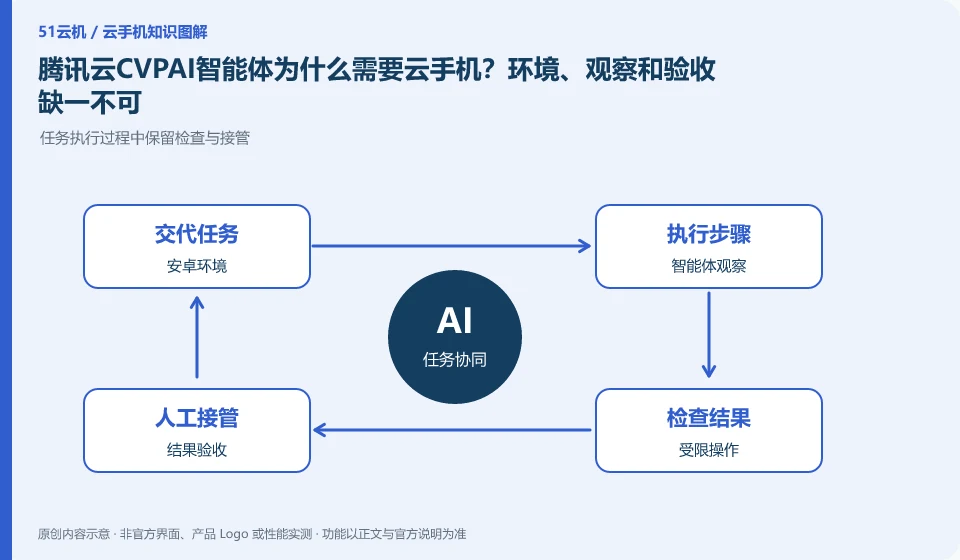
Regarding Tencent CloudCVP, the key to this issue is: cloud phone can provide a persistent Android operating environment, allowing agents to observe the interface and perform actions; however, the availability of the environment is only the basis, and models, control interfaces, identity permissions, and result checks are still needed. You cannot think of purchasing a cloud machine as having a complete AI assistant.
Known information about Tencent CloudCVP and the key points of this verification
Tencent CloudCVP provides cloud Android resources and multiple integration portals. The official product page includes AI agent scenarios, and the documentation distinguishes between cloud API and client SDK.
The official website lists CUA mobile smartphone scenarios. For specific models, tools and deployment conditions, you still need to check the current guide. It does not claim that it is fully functional after activation.
The evidence boundaries of this article are: public image documents require enterprise real-name authentication; AI scenario introduction does not guarantee that any agent can run without configuration.
How this issue applies to this product
The Tencent CloudCVP product page clearly displays the AI agent and CUA mobile scenarios, which can be used as an entry point for further research on the environment and control interfaces. It does not mean that all models can be directly operated after being connected, nor does it prove that any App has no pop-up windows, login and permission obstacles. Specific tools and deployment conditions should still be reviewed in the corresponding current guidance.
When evaluating, start with a small amount of enterprise test resources and separate the observation screen, sending action and verification results. The cloud API is responsible for resource-related work, and the terminal SDK and control link have separate divisions of labor. The model needs to complete clear tasks under these conditions. First try low-impact operations within your own application, add session invalidation and abnormal stop use cases, and then discuss repeated runs. This article does not have actual testing of Tencent CloudAgent and does not provide success rate rankings; complete pilot evidence is needed between functional demonstration and the final acceptable business results of the organization.
The task log should also control the scope of data, save only the images or actions needed to reproduce the problem, and enter customer content without distinction. Running an agent in the cloud will not automatically eliminate the risk of information exposure. Records, permissions and manual takeover are conditions that the project needs to be designed and verified separately.
Understand what this question covers
Start with an application task with clear boundaries and agree on which actions can be done automatically and which ones must be manually confirmed. Use a test account to verify the locating page, handle pop-ups, and stop on failure. If there is insufficient evidence of task completion, manual review should be retained to prevent the agent from covering up mistakes with endless clicks.
Check in this order
- Define tasks, available tools, and confirmation points not to be crossed.
- Connect the observation and control links to the test cloud machine and record the results of each step.
- Added the ability to stop abnormally after completing the checksum, and then consider continuing the operation after verification.
Sources and scope
- Tencent CloudCVP product page
- Tencent Cloud mobile technology access
- Tencent Cloud mobile public image
Sources checked on October 26, 2026. This article combines AI-assisted research of public information with independent analysis and verification suggestions; we have not conducted a hands-on test of this product. Features and costs depend on the current official documentation and your order.
Continue reading:Cloud phone basics · Cloud phone troubleshooting guide · Brand reference directory。
Related questions to explore
- Before provisioning Tencent Cloud CVP: eligibility and responsibilities
- Tencent CVP Cloud API versus client SDK: backend and session responsibilities
- What is a Tencent CVP image? A template is not a file backup
Back to the brand and product knowledge directory · Browse cloud phone topics