
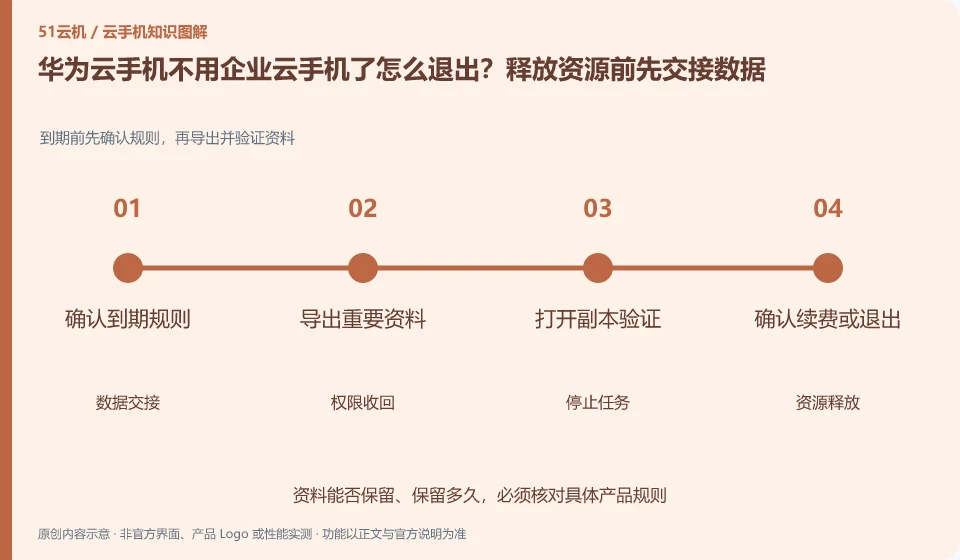
Regarding Huawei Cloud phones, the key to this issue is: Exiting requires processing business data, user access, and cloud resource fees at the same time. Deleting the App icon or deactivating an account cannot automatically complete file transfer, member revoking, and resource release; incorrect order may cause data loss or continued billing.
Known information about Huawei Cloud phones and the key points of this verification
Huawei CloudKooPhone and cloud phone server CPH are service levels that need to be distinguished. KooPhone documentation provides examples and node concepts; CPH documentation provides server and access management instructions.
When exiting, the cloud phone, related network and organizational accounts are included in the list. The actual release order is based on the current business dependencies.
The evidence boundary of this article is: the activation, SDK and billing models of the two product lines cannot be directly equivalent, nor does it mean that all third-party application authorizations will be automatically obtained after purchase.
Consider a specific scenario
Suppose you plan to stop using all test cloud phones after the project is completed. This is a verification plan, not our experience using this product. First of all, "data transfer, permission recovery and related resource release should be completed in sequence" as this completion standard. The original data should be saved before testing, and the first attempt should not be placed directly on important accounts and unique file copies.
The most easily overlooked thing in this scenario is that only deleting the client will leave cloud resources and the possibility of continuing billing. Therefore, it is necessary to separate the status that can be seen on the interface from the results that really need to be delivered. Being able to reproduce, explain and withdraw is more valuable than getting only one success notification.
Check in this order
- List resources, owners, copies of data, and handover recipients.
- After verifying that the export is readable, revoke member and application access and stop the task.
- Release relevant resources according to current billing rules and review subsequent bills.
How to hand over records to the support channel of Huawei Cloud phone
When submitting a question, first state "How to log out of Huawei Cloud phone if it is no longer used as an enterprise cloud phone? Hand over data before releasing resources", and then attach the device number, selected client and system version, failure steps, and current time. The key point of verify in the brand information is "Include cloud phone, related network and organizational accounts into the list when exiting. The actual release sequence is subject to current business dependencies." Therefore, do not just send a screenshot of the homepage, nor do you need to put the complete password, verification code or private key into the problem description. When it comes to order or business qualifications, you should contact support from the official entrance where this product can be verified.
Understand what this question covers
First confirm which files must be retained, who is responsible for receiving them, and the retention period before arranging the stop task and export. The configuration of the rebuildable test environment should also be recorded to avoid being unable to reproduce it in the future. Finally, check the order, network and ancillary resource status, and save the release results as the basis for bill review.
A reusable verification log
You can copy the table below into your notes. Record the device ID, verification date and current version. It helps identify which step failed and lets you repeat the same checks after changing clients or services.
| Checkpoint | What counts as a pass | What to do if it fails |
|---|---|---|
| Before operation | Device, account, time and data range recorded | When critical data is not backed up, stop any clearing or resource release actions first |
| During execution | Each operation has a sequence, please read the important tips first. | Pause when encountering different impact prompts than expected, and do not blindly continue to confirm. |
| after the end | Check equipment availability and core task actual results | When only a success notification appears but the content is not verified, the process is not marked as completed. |
| Follow-up review | Bills, authorizations and copies of documents have review dates | Designate a person responsible for unfinished matters to avoid treating one operation as permanent guarantee |
Sources and scope
- KooPhone cloud phone service overview
- Huawei CloudKooPhone product page
- Huawei CloudCPH product introduction
Sources checked on October 26, 2026. This article combines AI-assisted research of public information with independent analysis and verification suggestions; we have not conducted a hands-on test of this product. Features and costs depend on the current official documentation and your order.
Continue reading:Cloud phone basics · Cloud phone troubleshooting guide · Brand reference directory。
Related questions to explore
- Huawei KooPhone versus CPH: different service layers
- Huawei cloud phone instance and node editions: budgeting and management units
- Huawei cloud phones for work: data and organizational requirements
Back to the brand and product knowledge directory · Browse cloud phone topics