
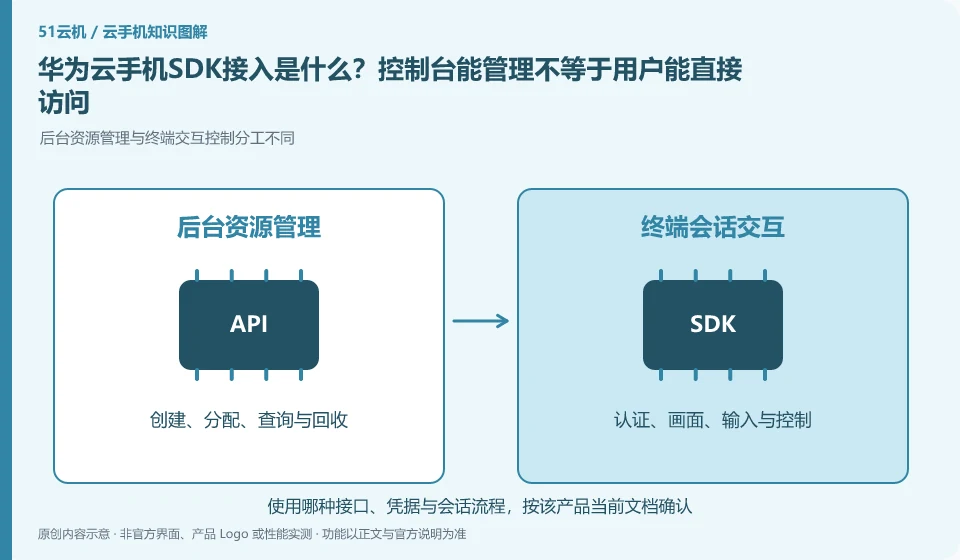
Regarding Huawei Cloud phones, the key to this issue is: the management API is responsible for creating and maintaining resources, and the SDK is responsible for integrating remote control capabilities into your application or web page. The two solve different problems; the ability to create a cloud phone in the background does not mean that the end user already has a login, allocation and control interface.
Known information about Huawei Cloud phones and the key points of this verification
Huawei CloudKooPhone and cloud phone server CPH are service levels that need to be distinguished. KooPhone documentation provides examples and node concepts; CPH documentation provides server and access management instructions.
The official provision of multiple development portals is not equivalent to existing terminal applications; the integrator also needs to be responsible for identity, device allocation and connection life cycle.
The evidence boundary of this article is: the activation, SDK and billing models of the two product lines cannot be directly equivalent, nor does it mean that all third-party application authorizations will be automatically obtained after purchase.
How this issue applies to this product
The Huawei CloudKooPhone product page introduces API, SDK, and multi-terminal access. Developers should understand these entrances in the complete user process. Being able to obtain or create resources does not mean that the business user has obtained the correct instance; being able to display the cloud machine screen does not mean that the organizational role, session period, and exit have been completed.
Minimal integration can first clarify that the business backend is responsible for identity and resource allocation, the terminal is responsible for establishing authorizable control sessions, and the cloud application is responsible for actual business. CPH related access data cannot be used as the same interface of KooPhone without verification. In addition to the first connection, the test must also cover user switching, invalidation, reconnection and withdrawal of authority; server credentials should not be placed on public web pages for the convenience of demonstration. This article does not provide interface names or parameters that have not been verified by the current documentation. During development, the official version of the corresponding product line shall prevail.
Client-side samples should not carry official user data for testing. First use the test identity to confirm that the resources are not misclassified, and then join the real business; if there is any doubt about the scope of the respective documents of KooPhone and CPH, record the page link and ask for official confirmation. Do not infer that the credentials or calling methods are common based on similar names.
Understand what this question covers
Authentication, device allocation, session connection and resource release processes should be drawn before access. The server key remains on the server side and the client uses short-lived or restricted access credentials. It also needs to deal with disconnection and reconnection, permission invalidation and device occupation, not just running the sample page.
Check in this order
- Split the responsibilities of backend resource management and front-end control interface.
- Create, assign, connect, and exit the link using the test identity.
- Check for credential exposure, reconnection, and expiration behavior before scheduling formal integration.
Sources and scope
- KooPhone cloud phone service overview
- Huawei CloudKooPhone product page
- Huawei CloudCPH product introduction
Sources checked on October 26, 2026. This article combines AI-assisted research of public information with independent analysis and verification suggestions; we have not conducted a hands-on test of this product. Features and costs depend on the current official documentation and your order.
Continue reading:Cloud phone basics · Cloud phone troubleshooting guide · Brand reference directory。
Related questions to explore
- Huawei KooPhone versus CPH: different service layers
- Huawei cloud phone instance and node editions: budgeting and management units
- Huawei cloud phones for work: data and organizational requirements
Back to the brand and product knowledge directory · Browse cloud phone topics