
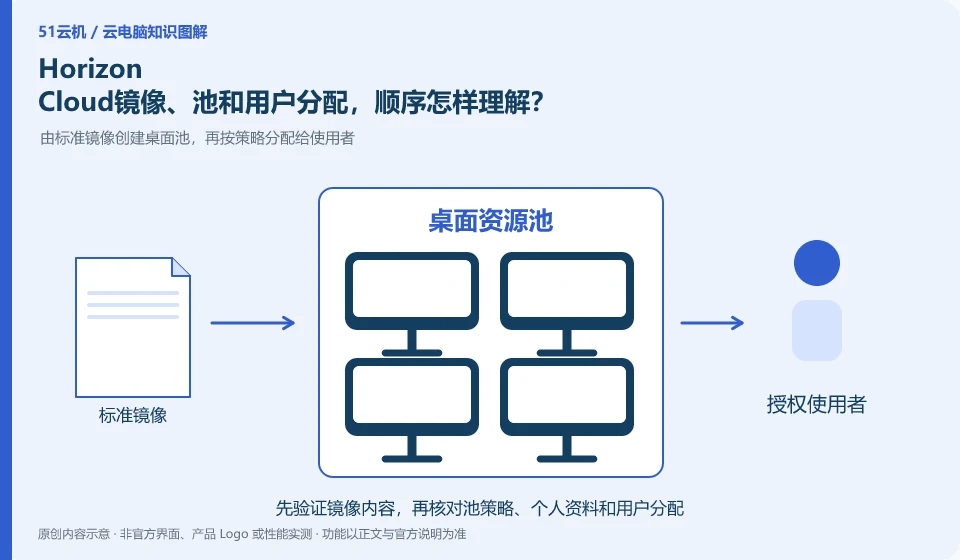
Mirroring determines the standard environment, desktop or application pool organization resources, and user assignments determine who can see them. Omnissa technical information shows the relevant processes, and understanding the relationship is more reliable than memorizing a certain version of the console buttons.
Who this is for:Regular readers and small teams who are working on Omnissa Horizon and need to solve specific problems in the title. Data verification date: 2026-10-26.
First, identify the product line
The Omnissa product catalog lists Horizon 8, Horizon Cloud and other digital workspace components separately. Horizon Cloud's documentation discusses images, desktop pools, applications, and user assignments; therefore "installing the Horizon client" does not equate to having a cloud PC that can be logged into.
The desktop pool cannot be estimated based only on the total number of people
First use the test image to create a small range of resources, then assign the test group, and finally connect as a normal user. If the desktop can be started but cannot be seen by users, you should go back to distribution and release to check; you must also verify applications and personal information before updating the image, and cannot just confirm that the administrator has successfully logged in.
Desktop pool planning should distinguish between registered users, simultaneous online users and the resources consumed by each person. Many people logging in occasionally versus a small number of people constantly using graphics software are different capacity issues. First collect working hours, typical applications and concurrency peaks, and then decide how to allocate desktops; do not regard the number of people that the sample deployment can carry as your own production capacity.
Capacity verification should include login peaks, application startup and exit recycling. Testers use the same baseline task, mix in a small amount of real heavy load, and look at response, memory and storage rather than just the CPU. Scaling up and down also involves data location, permissions, and task interruption, so set clear trigger conditions and fallback paths. When user experience declines, first look at session and resource indicators to avoid blindly increasing all specifications.
Check each requirement for your task
- Count working hours, number of concurrent users, and typical applications instead of just counting accounts.
- Use baseline tasks to simulate login spikes and observe resources and sessions.
- Clarify the triggering conditions for expansion and contraction, data retention and failure fallback process.
Check identity, licensing and desktop assignment together
Successful login does not guarantee an available desktop. Organizing desktops generally also requires users to be assigned to corresponding resources, application groups or workspaces; identity authentication, access authorization and desktop preparation are three things. If you encounter a blank list, first ask the administrator to check the organization and resource allocation to which the account belongs, instead of repeatedly changing passwords or creating multiple new accounts.
Where the conclusion applies and what to do next
Historical VMware Horizon data must be checked with the current Omnissa product version; Horizon 8 and Horizon Cloud cannot replace tutorial by name alone.
This article is based on public information. We have not purchased or tested the product. The scenarios describe ways to verify suitability, not customer case studies. Features and terms depend on the current official documentation for the relevant version.
Official sources and further reading
- Omnissa Product Catalog:Officially distinguishes between Horizon 8, Horizon Cloud and management components.
- Omnissa Horizon Cloud:Official cloud desktop product line and deployment positioning.
- Omnissa Horizon Cloud Technical Data: Documents and demonstrations include the process of importing images, creating pools, and user assignments.
Read more:Cloud PC knowledge hub · Find an article for your question · Omnissa Horizon product line identification
Related questions to explore
- Omnissa Horizon 8 versus Horizon Cloud: the differences
- Using older VMware Horizon documentation after the brand change
- Does installing Horizon Client give you a cloud PC? Resources and licenses matter
Back to the brand and product knowledge directory · Browse cloud PC topics