
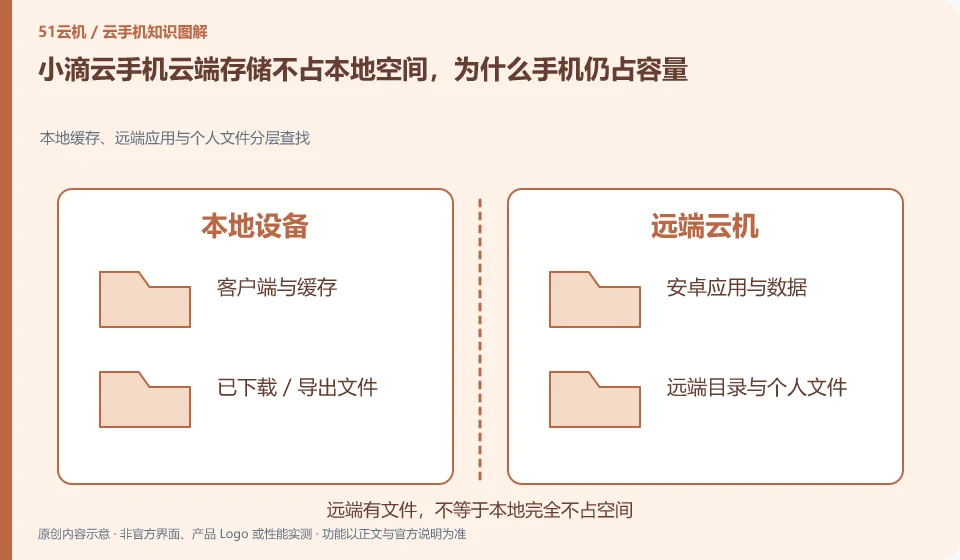
Regarding the Xiaodi Cloud phone, the key to this issue is: the application is mainly installed in the cloud, which does not mean that the local client is completely occupied. The client itself, cache, logs, screenshots and downloaded files may still be saved locally; cloud storage and local cache should be checked separately and cannot be mixed into one spatial number.
Known information about Xiaodi Cloud phones and the key points of this verification
Xiaodi Cloud phone is an Android mobile phone product running on a remote server. The official website provides web, Windows, macOS and mobile portals, and indicates the data cleanup when expiration or replacement.
Check the cloud machine capacity and physical phone cache separately, especially do not delete cloud drafts by mistake just to clear local space.
The evidence boundary of this article is: the official website developer is Changsha LDCloud Network Technology Co., Ltd.; being a joint operator does not mean that accounts and packages are necessarily interoperable.
Understand what this question covers
First check the client usage in the local system settings, then go to Cloud Android to check the remaining storage. Clearing the local cache usually targets the access end, while deleting cloud files may directly affect applications and drafts. When you need to free up space, you should first identify the file ownership to avoid accidentally clearing the entire cloud machine to save local space.
Consider a specific scenario
Suppose you prepare a physical mobile phone that prompts that the capacity is insufficient but there is still space left in the cloud. This is a verification plan, not our experience using this product. First of all, "identifying the locations occupied by local cache and cloud files" should be regarded as the completion standard for this time. The original data should be saved before testing, and the first attempt should not be placed directly on important accounts and unique file copies.
What is most easily overlooked in this scenario is that clearing the system in the cloud may not release the local client cache. Therefore, it is necessary to separate the status that can be seen on the interface from the results that really need to be delivered. Being able to reproduce, explain and withdraw is more valuable than getting only one success notification.
Check in this order
- Take screenshots of the local client usage and cloud storage pages respectively.
- Find out about large files, app caches, and must-save drafts.
- After backing up, clean it in the corresponding location and confirm that the application can still be opened normally.
A reusable verification log
You can copy the table below into your notes. Record the device ID, verification date and current version. It helps identify which step failed and lets you repeat the same checks after changing clients or services.
| Checkpoint | What counts as a pass | What to do if it fails |
|---|---|---|
| Location classification | Contents are listed separately for local, cloud and independent storage | If you are not sure where the data is, check the directory first and do not clear the entire machine. |
| importance | Find content that cannot be regenerated from an account or installation package | When there is no readable copy of important content, stop the release or replacement plan first |
| Operation verification | Check files and apps one by one after cleaning or exporting | The success prompt cannot replace file readability and quantity verification. |
| Recovery method | At least know how to retrieve key content in the new environment | When there is only one copy left in the leased environment, continue to schedule independent backups |
How to hand over records to the support channel of Xiaodi Cloud phone
When submitting a question, first state "Xiaodi Cloud phone cloud storage does not occupy local space, why does the mobile phone still occupy capacity?", and then attach the device number, selected client and system version, failure steps and current time. The key point of verify in the brand information is to "check the cloud machine capacity and physical phone cache separately, especially do not accidentally delete cloud drafts to clear local space." Therefore, do not just send a screenshot of the homepage, nor do you need to put the complete password, verification code or private key in the problem description. When it comes to order or business qualifications, you should contact support from the official entrance where this product can be verified.
Sources and scope
Sources checked on October 26, 2026. This article combines AI-assisted research of public information with independent analysis and verification suggestions; we have not conducted a hands-on test of this product. Features and costs depend on the current official documentation and your order.
Continue reading:Cloud phone basics · Cloud phone troubleshooting guide · Brand reference directory。
Related questions to explore
- Xiaodi Cloud Phone and LDCloud: a shared developer does not mean interchangeable services
- Xiaodi Cloud Phone web access: website, sign-in page and console are different
- Reading Xiaodi Cloud Phone specifications: CPU, RAM, storage and image quality
Back to the brand and product knowledge directory · Browse cloud phone topics