
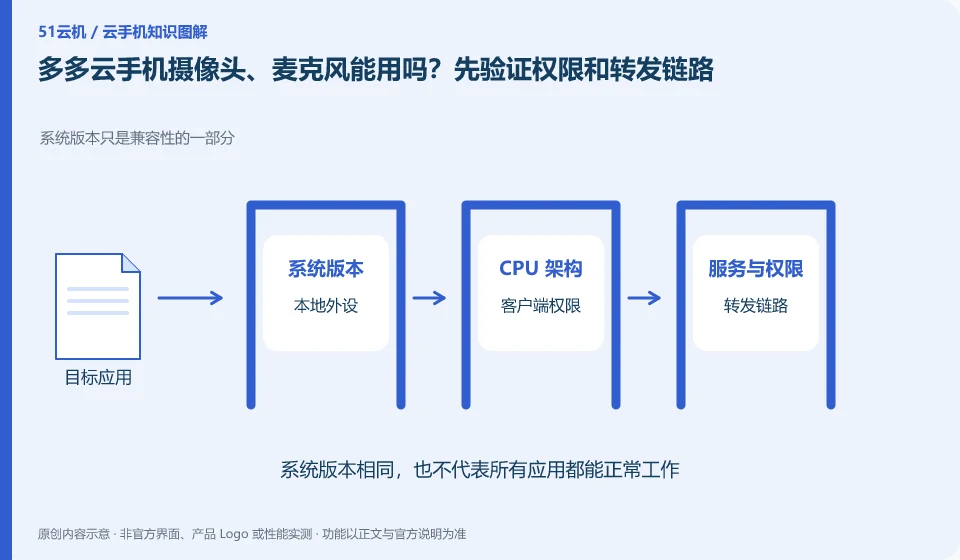
Regarding the Duoduo Cloud phone, the key to this problem is: Cloud Android is not naturally connected to the physical camera in your hand. Whether code scanning, voice recording, and taking photos can be used depends on the product's local forwarding capabilities, client permissions, browser restrictions, and the requirements of the target application.
Known information about Duoduo Cloud phones and the key points of this verification
The Duoduo Cloud phone official website also introduces cloud phone and business-oriented capabilities. The official website lists scenarios such as application upload, batch synchronization, simulation testing, and cloud office.
Capabilities such as scanning, audio and video must be verified with the current client respectively, and the existing function description is not pushed to be applicable to all identity verifications.
The evidence boundary of this article is: official website cooperation display does not mean that these companies provide endorsement for all functions; the scope of functional support must still be verified item by item.
How this issue applies to this product
When the Duoduo Cloud official website displays application scenarios such as code scanning and audio and video, readers need to separate the "business capability introduction" and "available entrances to their own clients". The capabilities for integrated customers may not be open to individual access terminals in the same way; a camera has been shown in a demonstration, but it cannot prove that every package and every application is suitable.
For a teaching code scanning requirement, first identify whether the required capabilities exist on the current official terminal, and then use a non-sensitive QR code to observe the complete input path; for voice requirements, test playback and input separately. If the team is going to use audio and video for business, they need to further inquire about supported terminals, permission applications and exception handling, rather than just selecting configurations from the marketing page. The application's own identity, payment and device trust requirements exist independently, and product scenario introduction cannot replace these requirements.
If the individual client cannot find the capabilities in the demo, it should record the client and version and ask for applicable conditions, rather than installing third-party so-called enhancement plug-ins. Business presentations may have specific integration prerequisites, and in the absence of front-end evidence, it is more useful to admit unconfirmation than to guess an unreliable path to action.
Understand what this question covers
Scenarios that require a camera are different than just playing back footage. There is a camera button in the device list, which does not prove that all face verification or payment processes are suitable. The test should start with taking photos and recordings without sensitive content before judging whether it is suitable for real tasks; do not change identity information in order to pass verification.
Check in this order
- Check local system permissions, client permissions and cloud application permissions respectively.
- First record a normal voice or take photos of non-private items and check the sound and picture.
- Verify the actual entry in the target application and use the physical device instead if not supported.
Sources and scope
Sources checked on October 26, 2026. This article combines AI-assisted research of public information with independent analysis and verification suggestions; we have not conducted a hands-on test of this product. Features and costs depend on the current official documentation and your order.
Continue reading:Cloud phone basics · Cloud phone troubleshooting guide · Brand reference directory。
Related questions to explore
- What is Duoduo Cloud Phone? Environment, access and intended users
- Duoduo synchronized controls: which actions should remain separate?
- App testing on Duoduo: cloud phones do not cover every physical-device difference
Back to the brand and product knowledge directory · Browse cloud phone topics