
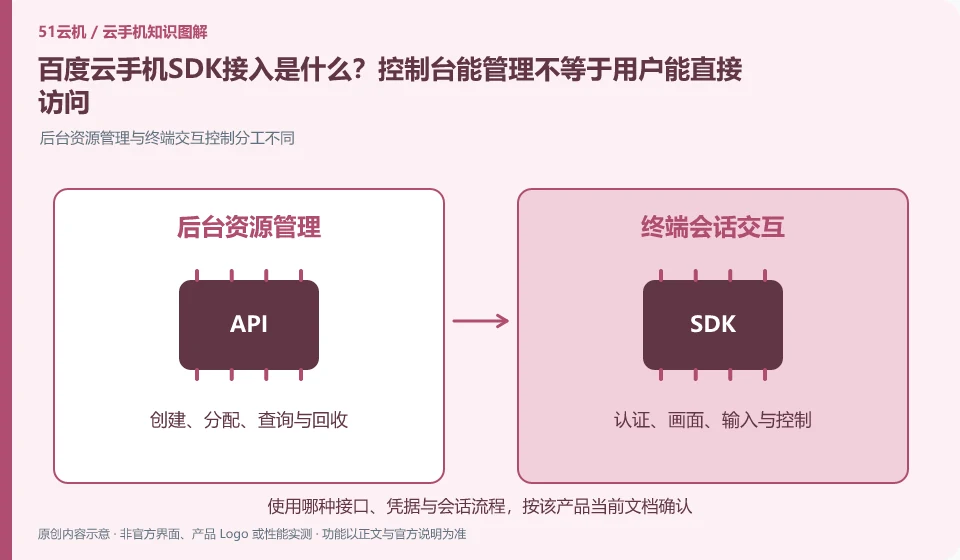
Regarding Baidu Cloud Phone, the key to this issue is: the management API is responsible for creating and maintaining resources, and the SDK is responsible for integrating remote control capabilities into your application or web page. The two solve different problems; the ability to create a cloud phone in the background does not mean that the end user already has a login, allocation and control interface.
Known information about Baidu Cloud Phone and the key points of this verification
Baidu AI Cloud cloud phone product provides cloud Android instance capabilities for enterprises. Official information distinguishes basic services from the ready-made client and operating platform capabilities of the Quick Edition.
The division of labor between the resource console and the terminal SDK must be clear, and server credentials cannot be directly placed on public web pages for the convenience of demonstration.
The evidence boundary for this article is: the merchant identity, order, and support boundaries between consumer brands and enterprise cloud services cannot be confused.
How this issue applies to this product
Baidu AI Cloud information distinguishes between basic cloud phone and quick version. Basic resource access and merchant solutions with ready-made clients and operating platforms have different development work. Before reading the SDKtutorial, first confirm the form of the product you are purchasing and preparing to deliver, and avoid downloading the merchant operation portal as an ordinary personal client.
If you already have a website and want to join the Android environment, the background needs to handle user identity, device ownership and life cycle, and then the terminal has access to appropriate control capabilities. The SDK sample runthrough is only the starting point for the connection. User exit, device recycling, credential timeout, and error retries should also be tested. Enterprise certification and purchase readiness should also be confirmed separately in the project list. This article does not deploy Baidu access code, and does not forge parameters that can be copied and used; the tasks covered by the ready-made operation platform are still subject to the current service agreements and official documents.
Before delivery, you should also verify how the business system will prompt the user when the device does not exist or has been released. This exception process belongs to integration work and is not an automatic result of successful sample connection. Only by clearly handling the failure can users avoid placing orders repeatedly or constantly trying invalid sessions.
Understand what this question covers
Authentication, device allocation, session connection and resource release processes should be drawn before access. The server key remains on the server side and the client uses short-lived or restricted access credentials. It also needs to deal with disconnection and reconnection, permission invalidation and device occupation, not just running the sample page.
Check in this order
- Split the responsibilities of backend resource management and front-end control interface.
- Create, assign, connect, and exit the link using the test identity.
- Check for credential exposure, reconnection, and expiration behavior before scheduling formal integration.
Sources and scope
- Baidu AI Cloud cloud phone product page
- Baidu AI Cloud Android cloud phone usage reference
- Baidu cloud phone official documentation
Sources checked on October 26, 2026. This article combines AI-assisted research of public information with independent analysis and verification suggestions; we have not conducted a hands-on test of this product. Features and costs depend on the current official documentation and your order.
Continue reading:Cloud phone basics · Cloud phone troubleshooting guide · Brand reference directory。
Related questions to explore
- Baidu cloud phone editions: building capabilities versus using a ready-made platform
- Before provisioning Baidu enterprise cloud phones: eligibility and responsibilities
- Separating Baidu cloud phone resource and network costs
Back to the brand and product knowledge directory · Browse cloud phone topics