
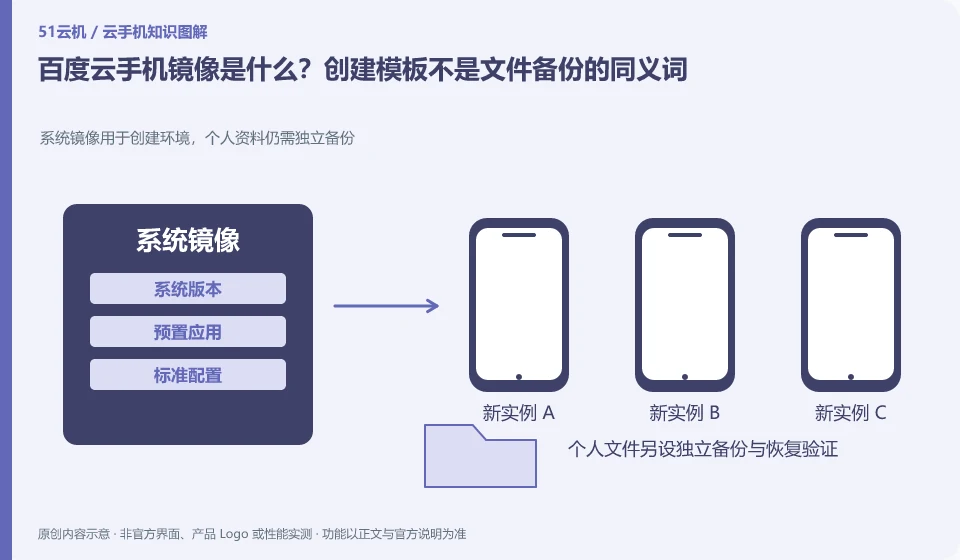
Regarding Baidu Cloud Phone, the key to this issue is: the image is a template for creating an Android environment, which can include system and preset content; backup focuses on restoring your existing data. When you see the "Mirror" button, you cannot automatically assume that the login state, all user files, and external service data can be completely restored.
Known information about Baidu Cloud Phone and the key points of this verification
Baidu AI Cloud cloud phone product provides cloud Android instance capabilities for enterprises. Official information distinguishes basic services from the ready-made client and operating platform capabilities of the Quick Edition.
The image should be managed as a repeatable initial environment, with separate backup strategies for accounts and user files, and templates should not be used as universal recovery points.
The evidence boundary for this article is: the merchant identity, order, and support boundaries between consumer brands and enterprise cloud services cannot be confused.
How this issue applies to this product
The image in Baidu Cloud Phone is suitable to be understood as a template for reproducible creation of the initial environment, rather than a universal backup of all user content. The arrangements for application preparation for basic resources and Quick Delivery may be different. The team should first check the image range allowed by the current document before formulating its own version management method.
For example, when a test application is released every week, the system and package versions can be recorded for the initial environment, and fixed use cases can be run after creating a new device to confirm that the template is truly rebuildable. Personal accounts, drafts, and files generated during runtime should use independent saving strategies, and exporting should not be omitted just because the template exists. Clear sensitive credentials before updating the template, retain the differences between the old and new versions, and avoid spreading the logged-in real environment without records. This article does not verify any image creation buttons, make up background menus, or claim that all application data will be restored with the image.
The template manifest can also document content that should not be included, such as personal logins and temporary downloads. Establishing clear exclusions will help avoid mixing business operation data into the initial environment during subsequent updates; whether a certain directory is included should be confirmed through the current product description and new instance verification.
Understand what this question covers
Record the version and default application when using public images, and remove personal accounts and credentials before making custom templates. After the template is updated, it should be accepted on the newly created test instance and should not directly cover the production environment. When files need to be restored, independent backup and export methods should also be confirmed.
Check in this order
- Record the public images and application versions used to establish a repeatable initial state.
- Remove sensitive accounts before making the template, and check the included and excluded content.
- Create new device validations from templates and schedule updates and rollbacks.
Sources and scope
- Baidu AI Cloud cloud phone product page
- Baidu AI Cloud Android cloud phone usage reference
- Baidu cloud phone official documentation
Sources checked on October 26, 2026. This article combines AI-assisted research of public information with independent analysis and verification suggestions; we have not conducted a hands-on test of this product. Features and costs depend on the current official documentation and your order.
Continue reading:Cloud phone basics · Cloud phone troubleshooting guide · Brand reference directory。
Related questions to explore
- Baidu cloud phone editions: building capabilities versus using a ready-made platform
- Before provisioning Baidu enterprise cloud phones: eligibility and responsibilities
- Baidu cloud phone SDK integration: console management versus user access
Back to the brand and product knowledge directory · Browse cloud phone topics