
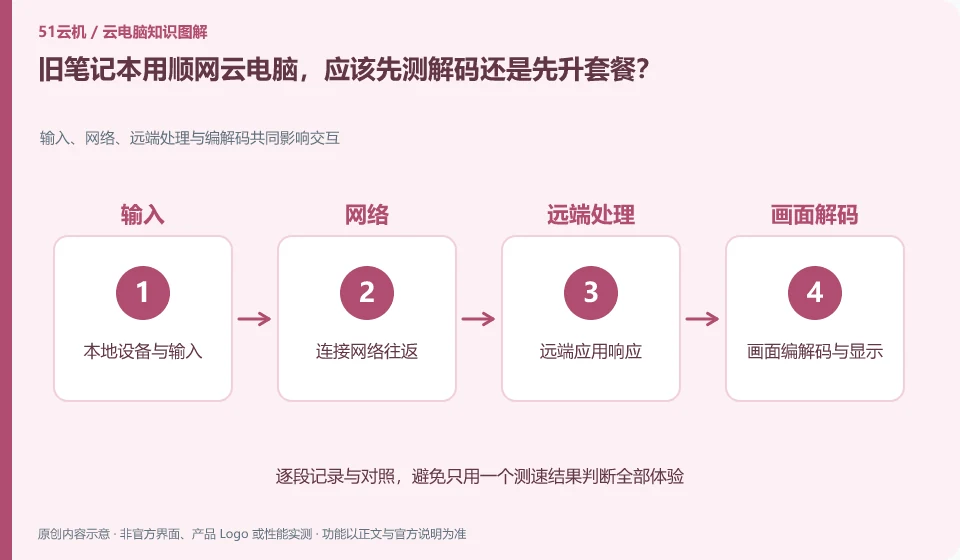
First verify whether the local device can display and input stably, and then determine whether higher cloud configuration is required. Although the old equipment does not undertake most of the remote computing, it still has to deal with picture decoding, network and display. Upgrading the package may not solve local lags.
Who this is for:Regular readers and small teams who are working on Shunwang Cloud PC, need to solve the specific problems in the title. Data verification date: 2026-10-26.
First, identify the product line
Shunwang Technology product page links to Shunwang Cloud PC, Shunwang computing resources cloud and Shunwang e-sports cloud PC respectively. The cloud PC portal for individuals includes selection and computing resources configuration; this is not the same thing as the delivery, contract and management system of an Internet cafe or e-sports hotel project.
Installing software and completing a workflow are different tests
Fix a picture and resolution, observe the client resource usage, and then reduce the image quality comparison. If local playback or decoding is obviously difficult, first adjust the client and display settings according to official recommendations; do not change nodes, graphics card packages, and computer power modes at the same time.
Software compatibility includes the operating system, processor architecture, permissions, drivers, licensing and data dependencies. A successful installation only confirms that the installation step worked. You still need to test launching, signing in, reading and writing files, and producing the required output. For domestic operating systems, older programs or software requiring special hardware, start with the vendor's support matrix rather than someone else's screenshot.
Create an application list, specifying the name, version, licensing method, dependent components and acceptance actions. Prioritize verification of core procedures that affect the business, and then deal with non-essential tools. If the application does not allow a virtualized environment or requires a local encryption device, it should be confirmed with the software vendor and desktop service provider at the same time. Do not use cracking, changing driver signatures, or bypassing authorization to determine "compatibility."
Check each requirement for your task
- Document software version, operating system, architecture, and licensing requirements.
- Check the current desktop and application official support matrix.
- Verify startup, login, data reading and writing and final output, and record failed links.
Cakes should be located hierarchically by link
If the picture is blurry but the mouse is slow, first observe the bit rate and image quality; if the operation is late but the picture is clear, pay attention to the delay and jitter; if only large files are uploaded slowly, check the upload path and bandwidth. Only change one variable at a time, for example, first change Wi-Fi to wired. Do not change nodes, adjust resolution, and reinstall the client at the same time. It is easier to get an effective answer by submitting the steps to reproduce the problem to official support than by simply saying "the configuration is not working".
Where the conclusion applies and what to do next
The recharge, computer room and data disk rules for consumer cloud PCs cannot be presumed to be the terms of service for e-sports hotels or enterprise projects.
This article is based on public information. We have not purchased or tested the product. The scenarios describe ways to verify suitability, not customer case studies. Features and terms depend on the current official documentation for the relevant version.
Official sources and further reading
- Shunwang Technology Product Matrix: The official catalog provides different product entrances for Shunwang Cloud PC, computing resources cloud and e-sports cloud PC.
- Shunwang Cloud PC official entrance: The page displays cloud PC client, AI application and data disk entrance; dynamic specifications and prices are not fixed facts.
- Shunwang Cloud PC web version: You can observe information such as the selected region and operator. The node availability needs to be reviewed when using it.
Read more:Cloud PC knowledge hub · Find an article for your question · Shunwang Cloud PC product line identification
Related questions to explore
- Shunwang Cloud PC, computing services and esports desktops: the differences
- Choosing a Shunwang Cloud PC region: consider your ISP and time of use
- What is the Shunwang Cloud PC data disk for?
Back to the brand and product knowledge directory · Browse cloud PC topics