
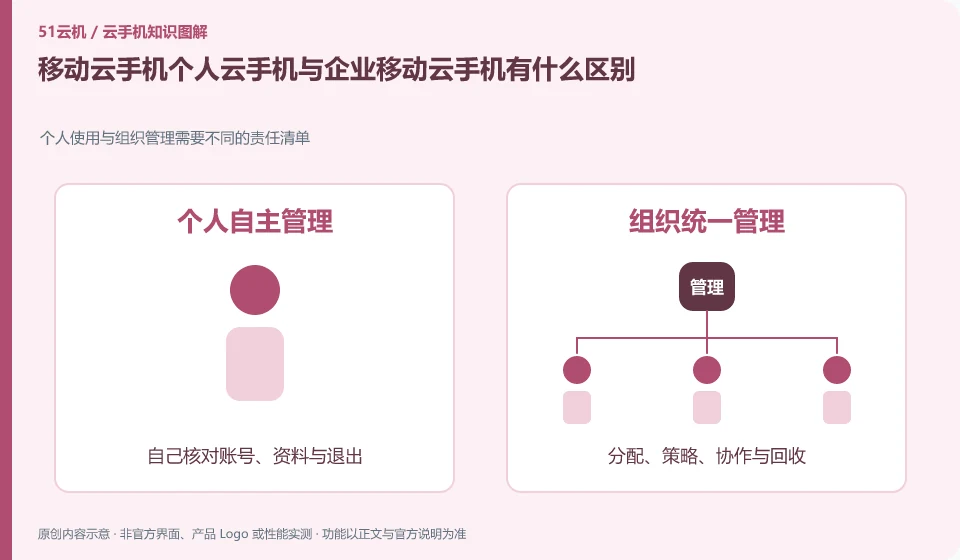
Regarding China Mobile Cloud phones, the key to this issue is: personal services are usually opened from the App or operator rights, while enterprise lines may be delivered through tenants, administrators and batch devices. Even if their names are similar, they may have different account numbers, processing qualifications, fee rules and service support channels.
Known information about China Mobile Cloud phones and the key points of this verification
The cloud phone business entrance can be found in the China Mobile online business hall. Provincial business hall business pages and enterprise China Mobile Cloud product information should not be used interchangeably.
This article puts China Mobile Cloud's corporate needs and China Mobile's public rights and interests in the same identification framework, and does not claim that their accounts, packages, or systems are exactly the same.
The evidence boundaries of this article are: the retrieved Jilin Mobile product page shows that it has been removed from the shelves, which does not mean that all provinces or enterprise lines are out of service; the current precise version and price of the enterprise line have not been verified. Details.
Understand what this question covers
First, confirm whether you will be using one device individually or if you want to allocate separate environments to multiple employees. Enterprise needs should also consider permission recovery, data export and unified deployment of applications; the entrances and discounts written in personal experience articles cannot directly become the basis for enterprise procurement.
Consider a specific scenario
Suppose you want to personally experience it and the company wants to distribute equipment to employees. This is a verification plan, not our experience using this product. First of all, "determine the user first and then select the corresponding activation data" should be regarded as the completion standard for this time. The original data should be saved before the test, and the first attempt should not be placed directly on important accounts and unique file copies.
What is most easily overlooked in this scenario is that treating personal rights and interests as a corporate procurement process will miss management responsibilities. Therefore, it is necessary to separate the status that can be seen on the interface from the results that really need to be delivered. Being able to reproduce, explain and withdraw is more valuable than getting only one success notification.
Check in this order
- State the personal or organizational purpose, determine the number of users and the responsible party.
- Check the opening qualifications, contracts and billing objects from the corresponding official channels.
- Use pilots to validate distribution, usage and exit processes before deciding on scale.
A reusable verification log
You can copy the table below into your notes. Record the device ID, verification date and current version. It helps identify which step failed and lets you repeat the same checks after changing clients or services.
| Checkpoint | What counts as a pass | What to do if it fails |
|---|---|---|
| operating position | Find a clear description of local or remote in the official description | If you cannot confirm, do not judge based on the appearance of the window. Ask about the specific product line first. |
| Task dependencies | Record whether the machine needs to be turned on all the time and whether it needs network access | When a dependency conflicts with your usage conditions, try another solution. |
| Data ownership | Find out where the installation package, application files and login accounts are saved. | When there is no independent export of important files, solve the problem of export first and then invest in it for a long time. |
| Exit method | Confirm the difference between stopping use, saving environment and releasing resources | If you still don’t know the fees or data status after logging out, keep the work order for verification. |
How to hand over records to China Mobile Cloud phone support channel
When submitting a question, first state "What is the difference between China Mobile Cloud personal cloud phone and enterprise China Mobile Cloud phone", and then attach the device number, selected client and system version, failure steps and current time. The key point of verify in the brand information is "This article puts China Mobile Cloud's enterprise needs and China Mobile's public rights and interests in the same identification framework, and does not claim that their accounts, packages or systems are exactly the same." Therefore, do not just send a screenshot of the homepage, nor do you need to put the complete password, verification code or private key into the problem description. When it comes to order or business qualifications, you should contact support from the official entrance where this product can be verified.
Sources and scope
Sources checked on October 26, 2026. This article combines AI-assisted research of public information with independent analysis and verification suggestions; we have not conducted a hands-on test of this product. Features and costs depend on the current official documentation and your order.
Continue reading:Cloud phone basics · Cloud phone troubleshooting guide · Brand reference directory。
Related questions to explore
- China Mobile Cloud Phone removed from an operator page: check provincial availability
- How to check that a China Mobile cloud phone entitlement is activated
- Does China Mobile Cloud Phone renew automatically? Check service and payment settings
Back to the brand and product knowledge directory · Browse cloud phone topics